The Ultimate Guide to the Best Outdoor Security Camera Systems
In an era where technology and security intersect more than ever, protecting your home, family, and property has become both a priority and an accessible reality. Outdoor security camera systems have evolved from grainy, complex, and expensive novelties into sleek, intelligent, and user-friendly guardians for any modern household or business. These devices are the digital eyes that never sleep, offering unparalleled peace of mind whether you're at work, on vacation, or simply in another room.
The evolution of smart outdoor cameras has been remarkable. Gone are the days of confusing wiring and VCR tapes. Today's systems offer crystal-clear video, instant alerts sent directly to your smartphone, and seamless integration with the broader ecosystem of smart home security systems. This guide is designed to be your definitive resource. We will demystify the technology, compare the top brands, and provide practical advice to help you select, install, and maintain the best outdoor home security camera system for your unique needs, ensuring you make an informed investment in your safety.
II. Benefits of Outdoor Security Camera Systems
Investing in a robust surveillance system is more than just purchasing a piece of technology; it's about investing in security, convenience, and control. The benefits extend far beyond simple video recording.
-
Crime Deterrence and Prevention: The most significant advantage is the powerful psychological deterrent that a visible camera provides. Studies have consistently shown that properties with visible outdoor surveillance cameras are far less likely to be targeted by burglars and vandals. It signals that your property is monitored and that evidence can be collected.
-
24/7 Monitoring and Remote Viewing: Modern systems grant you a live window to your property from anywhere in the world. Using a companion app on your smartphone or tablet, you can check in on your front door, backyard, or driveway in real-time. This allows you to monitor deliveries, watch your children playing outside, or ensure a contractor has arrived as scheduled.
-
Integration with Smart Home Devices: The true power of modern security lies in connectivity. The best outdoor security camera systems can integrate with platforms like Amazon Alexa, Google Assistant, and Apple HomeKit. This allows you to view camera feeds on your smart display, use voice commands, or create automated routines—like having your porch lights turn on when motion is detected.
-
Insurance and Safety Benefits: Many insurance companies offer discounts on homeowners' or renters' insurance premiums for having a certified security system. Furthermore, in the unfortunate event of a break-in or property damage, the recorded footage serves as invaluable evidence for law enforcement and insurance claims, potentially speeding up the process and ensuring a fair outcome.
III. Types of Outdoor Security Camera Systems
Understanding the different types of systems is the first step in choosing the right one. Each has its own set of advantages tailored to different installation environments and user preferences.
-
Wired vs. Wireless Outdoor Cameras:
-
Wired Cameras: These are typically more reliable as they draw power from your home's electrical system and often transmit data via a physical cable (like Ethernet for PoE cameras). They are ideal for permanent, high-performance installations where you don't want to worry about battery life. Installation can be more complex, requiring drilling and cable management.
-
Wireless Outdoor Cameras: "Wireless" usually refers to the data transmission (Wi-Fi), not always the power. They offer maximum flexibility and easy DIY installation. However, they rely on a strong Wi-Fi signal and, if battery-powered, require periodic recharging or battery replacement.
-
-
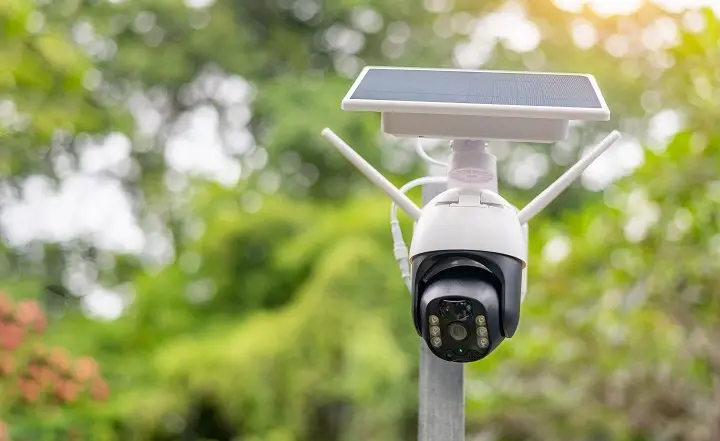
Battery-Powered and Solar-Powered Options: These are the ultimate in installation flexibility. Battery-powered cameras can be placed virtually anywhere. The advent of solar-powered cameras has been a game-changer, using an attached solar panel to continuously trickle-charge the battery, effectively eliminating the need for manual charging in sunny locations.
-
PoE (Power over Ethernet) Cameras: A popular choice for robust CCTV for home setups, PoE cameras use a single Ethernet cable to provide both power and a stable internet connection. This results in a highly reliable, high-bandwidth link perfect for 4K outdoor security cameras that require a lot of data. They typically require a PoE switch or injector.
-
Smart Cameras with AI Motion Detection: Modern systems have moved beyond simple motion sensors. They now incorporate artificial intelligence (AI) to distinguish between a person, a vehicle, an animal, and general motion like rustling leaves. This dramatically reduces false AI motion alerts and ensures you are notified about what truly matters.
-
Cloud vs. Local Storage Systems:
-
Cloud Storage: Video clips are encrypted and saved on the manufacturer's remote servers. This protects footage even if the camera is stolen or damaged. It usually requires a monthly subscription fee.
-
Local Storage: Footage is saved directly to a microSD card inside the camera or a Network Video Recorder (NVR) on your premises. This avoids monthly fees and can be faster to access, but footage is vulnerable to local theft or damage.
-
IV. Key Features to Look For
When comparing the best outdoor security camera systems, it's essential to look beyond the brand name and focus on the specifications that impact performance.
-
Video Resolution: This determines the clarity of your footage.
-
1080p (Full HD): The standard for clear, identifiable images.
-
2K/4MP: Offers a significant jump in detail, making it easier to see faces and license plates.
-
4K (8MP): The pinnacle of consumer video quality, providing stunning detail for large properties. 4K outdoor security cameras are becoming increasingly common.
-
-
Field of View (FoV): Measured in degrees, this indicates how much area the camera can cover. A wider FoV (e.g., 130° to 180°) means fewer cameras are needed to monitor a large space.
-
Motion Detection & Smart Alerts: Look for cameras with customizable activity zones and advanced AI motion alerts for people, vehicles, and animals. This feature is crucial for minimizing false notifications.
-
Two-Way Audio and Siren Alarm: A built-in microphone and speaker allow you to listen in and speak to visitors or deter intruders directly through the app. Some models include a built-in, remotely-triggerable siren.
-
Weatherproof Rating: For weatherproof security systems, look for an IP (Ingress Protection) rating of at least IP65 or IP66. This certifies the camera is dust-tight and protected against powerful jets of water, ensuring it can withstand rain, snow, and extreme temperatures.
-
Night Vision and Color Vision: Most cameras use infrared (IR) LEDs for black-and-white night vision. Higher-end models feature color night vision or "Starlight" sensors, which use ambient light to provide a color image in low-light conditions, adding valuable context.
-
App Connectivity and Subscription Services: A user-friendly app is the command center for your system. Evaluate what features are free versus those locked behind a subscription plan (like extended video history, advanced AI detection, or professional monitoring).
V. Top 10 Best Outdoor Security Camera Systems (2025 Edition)
Here’s a curated list of the top-performing and most popular outdoor surveillance cameras on the market, each with its own strengths.
1. Arlo Ultra 2
-
Pros: Stunning 4K HDR video, 180° field of view, integrated spotlight for color night vision, excellent AI detection.
-
Cons: Expensive, requires a subscription for the best features, and battery life can be short with high usage.
-
Price Range: Premium
-
Best For: Users who want the absolute best video quality and have a larger budget.
2. Google Nest Cam (Battery)
-
Pros: Seamless Google Home integration, familiar and intuitive app, 3 hours of free event history, strong AI that can recognize familiar faces.
-
Cons: Requires a Nest Aware subscription for most useful features (like 24/7 recording history).
-
Price Range: Mid-Range to Premium
-
Best For: Those deeply invested in the Google ecosystem who value smart home integration.
3. Ring Spotlight Cam Pro
-
Pros: Powerful built-in spotlights, Bird's Eye View feature (shows motion path on a map), easy integration with Ring Alarm systems, versatile power options (solar, battery, wired).
-
Cons: Almost all advanced features require a Ring Protect subscription.
-
Price Range: Mid-Range
-
Best For: Existing Ring users and those who want a strong, deterrent-focused camera with community alert features.
4. Eufy SoloCam S340
-
Pros: No monthly fees, local 4K storage on built-in SD card, dual-lens system (wide and telephoto), built-in solar panel for perpetual power.
-
Cons: The Eufy ecosystem is less integrated with third-party platforms, and privacy concerns have been raised in the past (do your research).
-
Price Range: Mid-Range
-
Best For: Budget-conscious users and privacy advocates who want high-quality local storage without subscriptions.
5. Reolink Argus 3 Pro
-
Pros: Extremely flexible with full-color night vision, affordable, works with a solar panel, and offers both cloud and local storage options.
-
Cons: AI detection is not as refined as top-tier brands, app can be less polished.
-
Price Range: Budget
-
Best For: DIYers on a tight budget who need a capable, wire-free camera with good solar support.
6. Lorex 4K Nocturnal Color System
-
Pros: Excellent color night vision performance, reliable PoE or wired systems, robust NVR local storage included, no monthly fees.
-
Cons: Professional installation recommended, less focus on smart home features.
-
Price Range: Mid-Range to Premium
-
Best For: Homeowners wanting a professional-grade, hardwired CCTV for home system with superior low-light capabilities.
7. Wyze Cam v4 Pro
-
Pros: Unbeatable value, 2K resolution, includes color night vision, very cheap Cam Plus subscription unlocks powerful AI features.
-
Cons: Build quality isn't as robust as more expensive brands, and connectivity can sometimes be finicky.
-
Price Range: Budget
-
Best For: Beginners and cost-focused users looking to dip their toes into home security without a major investment.
8. TP-Link Tapo C500
-
Pros: Great price-to-performance ratio, sharp 2K resolution, accurate person/pet detection, works with Alexa and Google Home.
-
Cons: Requires a wired power connection, limited advanced features.
-
Price Range: Budget
-
Best For: Anyone needing an affordable, reliable, wired camera for key entry points.
9. Blink Outdoor 4
-
Pros: Incredibly long battery life (up to two years), very affordable hardware, simple setup, and low-cost subscription plan.
-
Cons: Video quality and motion response lag behind competitors, and require a Sync Module to function.
-
Price Range: Budget
-
Best For: Monitoring low-traffic areas or vacation homes where long battery life is the top priority.
10. Swann 4K Bullet NVR System
-
Pros: Complete all-in-one kit, professional-grade weatherproof security systems, heavy-duty construction, true 24/7 recording with a large pre-installed hard drive.
-
Cons: System is bulky and complex for the average user, not a "smart" system in the traditional sense.
-
Price Range: Mid-Range to Premium
-
Best For: Large properties, businesses, and users who prefer a traditional, always-recording DVR/NVR system.
VI. Comparison Table
| System | Resolution | Connectivity | Power Source | Price Range | Key Smart Feature |
|---|---|---|---|---|---|
| Arlo Ultra 2 | 4K HDR | Wi-Fi | Battery / Solar | Premium | Integrated Spotlight, 180° View |
| Google Nest Cam | 1080p/2K | Wi-Fi | Battery / Wired | Mid-Premium | Familiar Face Alerts |
| Ring Spotlight Cam | 1080p/HD | Wi-Fi | Battery / Solar / Wired | Mid-Range | Bird's Eye View, Siren |
| Eufy SoloCam S340 | 4K | Wi-Fi | Solar | Mid-Range | No Subscription, Dual Lens |
| Reolink Argus 3 Pro | 2K | Wi-Fi | Battery / Solar | Budget | Color Night Vision |
| Lorex 4K System | 4K | Wired (PoE) | Wired | Mid-Premium | Nocturnal Color Vision |
| Wyze Cam v4 Pro | 2K | Wi-Fi | Wired | Budget | Extremely Low-Cost Subscription |
| TP-Link Tapo C500 | 2K | Wi-Fi | Wired | Budget | Accurate AI on a Budget |
| Blink Outdoor 4 | 1080p/HD | Wi-Fi | Battery (2-yr life) | Budget | Exceptional Battery Life |
| Swann 4K NVR Kit | 4K | Wired (BNC) | Wired | Mid-Premium | All-in-One Kit, 24/7 Recording |
VII. Installation & Setup Tips
A successful security system relies on proper placement and setup.
-
Step-by-Step Guide:
-
Plan Your Layout: Use your home's floor plan to identify blind spots and key areas (doors, driveways, gates).
-
Check Wi-Fi Strength: Use your smartphone to test the Wi-Fi signal at each planned camera location. Consider a Wi-Fi extender if the signal is weak.
-
Mount the Cameras: Follow the manufacturer's instructions. Ensure wired cameras are near an outlet and wireless cameras are mounted securely.
-
Download and Configure the App: Create an account, add your cameras, and connect them to your Wi-Fi network.
-
Adjust Settings: Fine-tune motion sensitivity, create activity zones, and set up notification preferences.
-
-
Placement Tips:
-
Height: Mount cameras 8-10 feet high. This is high enough to avoid tampering but low enough to capture clear facial details.
-
Angle: Point cameras across the path of approach rather than directly at it for a better side-view of faces.
-
Lighting: Avoid pointing cameras directly at light sources to prevent lens flare. Utilize the camera's built-in spotlights or install an external motion-activated light.
-
Privacy: Be mindful of pointing cameras where they might capture your neighbors' bedrooms or bathrooms.
-
-
Common Mistakes to Avoid:
-
Ignoring Wi-Fi range limitations.
-
Forgetting to charge battery-powered cameras before installation.
-
Not securing camera mounts allows them to be easily knocked down.
-
Leaving default passwords on your camera and router accounts.
-
VIII. Maintenance & Troubleshooting
Regular upkeep ensures your system remains reliable for years to come.
-
Regular Maintenance Checklist:
-
Monthly: Clean the camera lens and housing with a soft, dry cloth to remove dust, spider webs, and debris.
-
Seasonally: Check and tighten all mounts and connections. Trim any foliage that may have grown into the camera's field of view.
-
For Battery Cameras: Monitor battery levels and have a charging routine. For solar-powered cameras, wipe the solar panel clean to maintain efficiency.
-
-
Fixing Common Issues:
-
Connectivity Problems: Restart your camera and router. Ensure the camera is within a good Wi-Fi range.
-
False Motion Alerts: Adjust the motion sensitivity in the app and use activity zones to ignore areas with frequent non-essential movement (like a busy street).
-
Poor Video Quality: Check that the camera lens is clean and that your video quality is set to the highest setting in the app. For 4K outdoor security cameras, ensure your Wi-Fi can handle the bandwidth.
-
-
Firmware Updates: Enable automatic firmware updates in the app if available. These updates often include security patches, bug fixes, and new features.
IX. Privacy and Legal Considerations
Being a responsible camera owner is paramount.
-
Recording Laws: In the United States, it is generally legal to video record areas where there is no expectation of privacy, such as your front yard or driveway. Audio recording laws are stricter and often require consent from all parties (one-party or all-party consent laws vary by state).
-
Neighbor Privacy: Aim your cameras at your own property. If your camera inadvertently captures a small portion of a neighbor's yard, it's often best practice to inform them as a courtesy.
-
Data Protection: Always change the default passwords on your cameras and router. Use strong, unique passwords and enable two-factor authentication (2FA) on your camera account if offered. This is crucial to protect your outdoor cameras from hackers.
X. How to Choose the Right System for Your Needs
Ask yourself these questions to narrow down your choices:
-
Budget: What is your total budget for hardware and any potential monthly subscriptions?
-
Property Size: A small apartment may only need one camera, while a large property may require a multi-camera CCTV for a home.
-
Power Source: Do you have easy access to outdoor outlets, or do you need the flexibility of battery or solar-powered cameras?
-
Storage Preference: Do you prefer the convenience and off-site security of cloud storage (with a fee) or the cost-saving and control of local storage?
-
Tech Savviness: Are you comfortable with a DIY setup, or would you prefer a professionally installed system?
Quick Recommendations:
-
For Families: A system with reliable AI motion alerts for people and packages, like Google Nest or Arlo.
-
For Tech Enthusiasts: A system that deeply integrates with your chosen smart home platform.
-
For Budget-Conscious Users: Wyze, TP-Link Tapo, or Reolink offer fantastic value.
-
For Large/Rural Properties: A wired PoE system like Reolink or Lorex, or a long-range battery camera with solar.
XI. Expert Buying Tips (EEAT Section)
With over a decade of reviewing home security products, I've learned that the flashiest specs don't always make the best camera. Here is my distilled advice:
-
Prioritize Reliability Over Gimmicks: A camera that consistently records events and sends timely alerts is more valuable than one with a niche feature that rarely works properly. Read long-term user reviews to gauge reliability.
-
Beware of the "Total Cost of Ownership": A cheap camera with a mandatory $10/month subscription can become more expensive than a premium camera with free local storage within two years. Always calculate the 3-year cost.
-
Test Your Wi-Fi First: The most common point of failure is a weak Wi-Fi signal. Before buying, invest in a mesh Wi-Fi system if your property has dead zones. It will improve your entire smart home experience.
-
Start Small and Expand: You don't need to secure every corner of your property on day one. Buy a single highly-rated camera, test it for a month, and then build out your system based on what you learn.
-
Avoid Cheap, No-Name Brands: While tempting, these cameras often have critical security vulnerabilities, lack software updates, and may stop working entirely if the company disappears. Stick with established brands that have a reputation to uphold.
XII. Future Trends in Outdoor Security Cameras
The technology is advancing at a rapid pace. Here’s what to expect in the coming years:
-
Deeper AI Integration and Predictive Alerts: AI will move beyond simple classification to predictive behavior analysis. Cameras may learn your household's normal patterns and flag truly anomalous activity, like a person loitering for an extended period.
-
Ubiquitous Solar and Renewable Power: As solar panel efficiency improves, we will see more cameras with built-in, non-removable solar panels, making perpetual power the standard for wireless models.
-
360° Panoramic Cameras and Smart Tracking: Cameras with 360° lenses and advanced digital tracking will be able to follow a subject autonomously across a wide area, eliminating blind spots without needing multiple fixed cameras.
-
Radar and Thermal Imaging: These technologies, once reserved for military use, are becoming more affordable. They can detect motion through walls, fog, and foliage, offering a new layer of detection that complements traditional video.
XIII. Conclusion
Choosing the best outdoor security camera systems is a significant decision that directly impacts the safety of your home and the well-being of your loved ones. From the unparalleled video quality of 4K systems to the effortless installation of wireless outdoor cameras, there is a perfect solution for every need and budget. The key is to focus on the core features that matter most to you: reliable detection, clear video, a user-friendly app, and a sustainable storage plan.
By understanding the types, features, and considerations outlined in this guide, you are now equipped to make an informed choice.
Upgrade your home security today with one of these top-rated outdoor camera systems. The peace of mind that comes from knowing your property is monitored around the clock is an investment that pays for itself many times over.
Protect your property and loved ones with smart, weatherproof surveillance cameras.
FAQ Section
1. What is the best outdoor security camera system for home use?
For most homes, a system like the Arlo Ultra 2 or Google Nest Cam offers a great balance of video quality, smart features, and ease of use. However, the "best" is subjective. For a subscription-free experience, Eufy is excellent. For budget-conscious users, Wyze or TP-Link provides incredible value. Consider your specific priorities like power source, video storage, and smart home integration to find your perfect match.
2. Are wireless outdoor cameras secure?
Yes, provided you take basic security precautions. The biggest vulnerabilities are weak passwords and unsecured Wi-Fi networks. Always change the default password to a strong, unique one and enable two-factor authentication (2FA) if the app supports it. Regularly updating the camera's firmware is also crucial, as these updates often include critical security patches to protect against newly discovered threats.
3. How long do outdoor security cameras last?
The physical hardware of a quality camera can last 5 to 10 years with proper maintenance. However, technology evolves quickly, so you may choose to upgrade for new features before it fails. For battery-powered cameras, the rechargeable battery may need replacement every 2-3 years, depending on usage and climate. Wired cameras, with no battery to degrade, often have a longer functional lifespan.
4. Can outdoor cameras work without Wi-Fi?
Some can, but with limited functionality. Certain battery-powered cameras will still record motion events to a local SD card without Wi-Fi, but you won't receive live view or alerts. True professional CCTV for home systems that use a wired NVR (Network Video Recorder) can record 24/7 locally without an internet connection. For full "smart" features like remote viewing and alerts, a Wi-Fi connection is essential.
5. Do I need a subscription for video storage?
Not necessarily. Many brands, like Eufy, Reolink, and Lorex, offer robust local storage options (SD cards or NVRs) with no monthly fees. However, brands like Ring, Arlo, and Google Nest typically require a subscription to access features like extended video history, advanced AI person detection, and professional monitoring. Always check the storage model before you buy.
6. How to protect my outdoor cameras from hackers?
Protecting your cameras starts with securing your home network. Use a strong, unique password for your Wi-Fi. Change the default admin password on your camera and its associated account immediately. Enable two-factor authentication (2FA) wherever possible. Keep your camera's firmware updated, as manufacturers release patches for security vulnerabilities. Avoid using cheap, off-brand cameras from unknown companies.
7. What is the ideal resolution for outdoor cameras?
For most users, 2K (4MP) is the current sweet spot. It provides significantly more detail than 1080p, making it easier to identify faces and license plates, without consuming the massive amounts of data and storage that 4K requires. However, for large properties where you need to digitally zoom into a wide shot, 4K outdoor security cameras are worth the investment.
8. Can I install outdoor cameras myself?
Absolutely. The vast majority of modern wireless outdoor cameras are designed for easy DIY installation. They come with mounting hardware and step-by-step app guides. You typically only need a screwdriver and a ladder. Hardwired systems, especially PoE or traditional CCTV for home setups, may require more technical skill or professional installation for drilling and cable routing.
9. How to clean and maintain outdoor cameras?
Regular maintenance is simple. Once a month, use a soft, dry microfiber cloth to gently wipe the camera lens and housing to remove dust, dirt, and spider webs. For stubborn grime, slightly dampen the cloth with water. Avoid using harsh chemicals or abrasive materials. For solar-powered cameras, regularly clean the solar panel to ensure it can charge efficiently.
10. Are solar-powered outdoor cameras worth it?
If the camera location receives a decent amount of direct sunlight, solar-powered cameras are absolutely worth it. They eliminate the single biggest hassle of battery cameras: the need to physically take them down for recharging every few months. A good solar panel can keep your camera perpetually powered, making it a true "set it and forget it" security solution.
11. What’s the difference between outdoor and indoor cameras?
Outdoor cameras are built with durable, weatherproof security systems in mind, featuring IP65/IP66 ratings to withstand rain, snow, dust, and extreme temperatures. They are also typically more vandal-resistant. Indoor cameras lack this weatherproofing and are designed for a controlled climate. Using an indoor camera outside will void its warranty and likely cause it to fail quickly.
12. How to choose between wired and wireless setups?
Choose wired outdoor cameras if you want maximum reliability, 24/7 continuous recording (for PoE systems), and don't mind a more complex installation. Choose wireless outdoor cameras if you prioritize easy, DIY installation, flexibility in camera placement, and don't want to drill holes for cables. Battery-powered wireless cameras are the only option for locations far from a power outlet.