Understanding Your Home Fire Alarm System
Encountering a false alarm or needing to perform routine maintenance on your home fire alarm system can be a common, albeit sometimes startling, experience. Knowing how to reset your fire alarm is a crucial skill for any homeowner, ensuring both safety and peace of mind. This guide will walk you through the process, covering various alarm types and common scenarios, empowering you to handle these situations effectively.
Home fire alarm systems are designed as a critical first line of defense against the devastating effects of fire. They are sophisticated devices, but like any electronic equipment, they can occasionally malfunction, be triggered accidentally, or require a reset after a power outage or a real emergency. Understanding the basic components and functions of your fire alarm is the first step towards confidently managing its operation, including the essential task of resetting it. This comprehensive guide aims to demystify the process, providing clear, actionable steps for homeowners in 2025 and beyond.
The primary purpose of a fire alarm is to detect the presence of smoke or heat and alert occupants to evacuate immediately. Modern systems often integrate with other smart home devices, offering enhanced features and connectivity. However, the fundamental need to reset these devices after an event or for maintenance remains a consistent requirement. We will explore the nuances of different alarm technologies, from simple battery-operated units to complex interconnected systems, ensuring you have the knowledge to address any reset scenario.
The importance of a functioning fire alarm cannot be overstated. According to the National Fire Protection Association (NFPA) in their 2025 report, working smoke alarms reduce the risk of dying in a home fire by nearly half. This underscores why understanding their operation, including how to reset them, is not just a matter of convenience but a vital safety measure. This guide is designed to be your go-to resource, providing detailed instructions and helpful tips to ensure your home's safety systems are always in optimal working order.
Why Do Fire Alarms Need Resetting?
Fire alarms are designed to be highly sensitive to detect potential fire hazards quickly. However, this sensitivity can sometimes lead to unintended activations, commonly known as false alarms. These can be triggered by various factors, including cooking fumes, steam from showers, dust, insects, or even temporary power fluctuations. After a false alarm, or a real event that has been resolved, the alarm needs to be silenced and reset to return to its normal monitoring state.
Common Reasons for Resetting a Fire Alarm:
- False Alarms: As mentioned, cooking smoke, steam, and even airborne particles can trigger the alarm. Once the source is cleared, a reset is necessary.
- After a Real Fire Event: Following a confirmed fire that has been extinguished and the area is safe, the alarm system will need to be reset to resume its protective function.
- Power Outages: If your home experiences a power outage, interconnected alarm systems may chirp or go into a fault mode. A reset is often required to restore normal operation once power is restored.
- Battery Replacement: After replacing the batteries in a battery-operated or battery-backup smoke alarm, a reset might be needed to clear any fault indicators and ensure proper function.
- System Maintenance and Testing: Periodic testing of your fire alarm system is recommended. After testing, a reset ensures the system is functioning correctly and ready for its primary duty.
- Alarm Malfunction: Occasionally, an alarm unit might malfunction and begin to sound without any apparent cause. A reset can sometimes resolve minor electronic glitches.
In 2025, with the increasing prevalence of interconnected smart home systems, the reasons for needing a reset can also extend to software updates, connectivity issues, or errors reported by the central hub. Understanding these triggers helps homeowners proactively manage their alarm systems and avoid unnecessary panic. The NFPA recommends testing smoke alarms at least once a month and replacing batteries at least once a year, or when the low-battery warning sounds. These routine actions often necessitate a reset.
It's important to differentiate between a reset and silencing an alarm. Silencing typically mutes the alarm temporarily, while a reset returns the device to its full operational mode. For interconnected systems, resetting one unit might reset the entire network, depending on the system's design. This guide will cover both aspects to ensure you have a complete understanding.
Types of Home Fire Alarms and Their Reset Methods
The method for resetting a fire alarm can vary significantly depending on the type of alarm you have installed in your home. Understanding your specific model is key to performing the reset correctly. Here, we break down the most common types and their respective reset procedures.
1. Battery-Operated Smoke Alarms
These are the simplest and most common type of smoke alarm. They run solely on batteries and are not wired into your home's electrical system.
Resetting Battery-Operated Alarms:
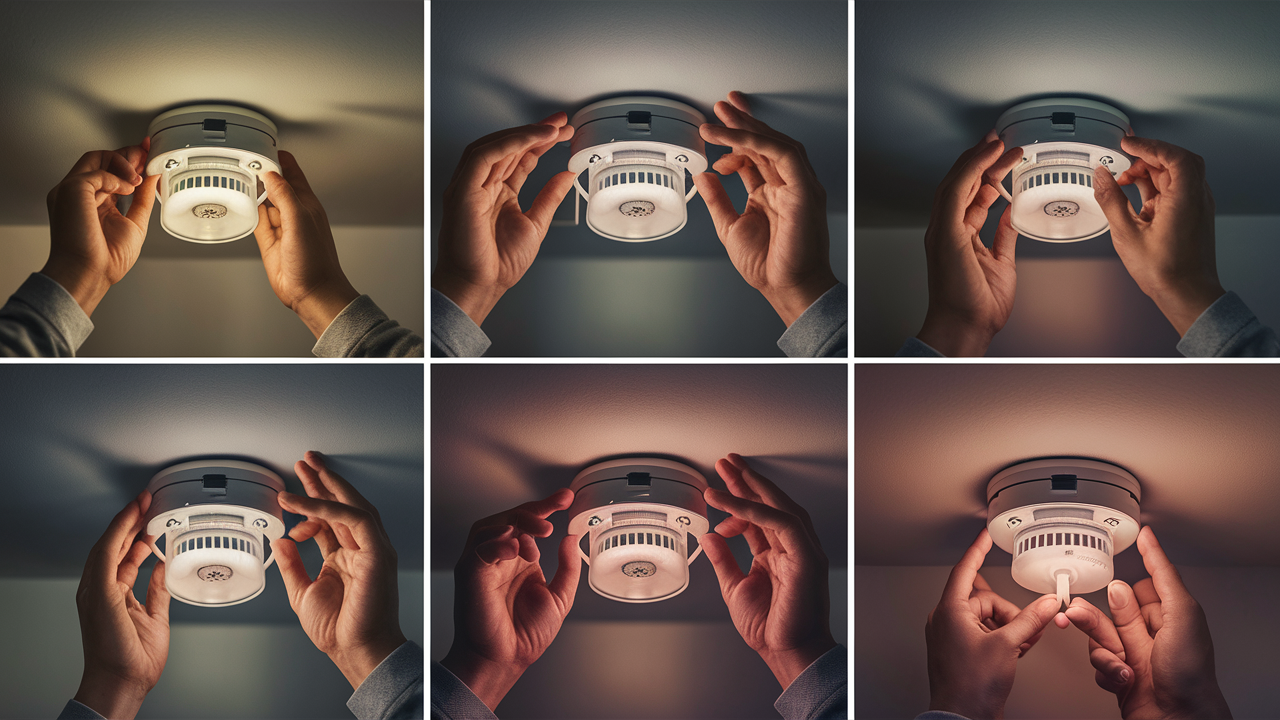
- Remove Power: Open the alarm's battery compartment and remove the battery.
- Press and Hold the Test Button: Press and hold the test button for at least 15-20 seconds. This helps to discharge any residual power from the unit.
- Wait: Wait for about 30 seconds to a minute.
- Reinstall Battery: Reinsert the battery, ensuring it is correctly oriented.
- Test the Alarm: Press the test button again to ensure the alarm is functioning properly.
Note: Some models might have a specific reset button or a different sequence. Always refer to your alarm's user manual if unsure.
2. Hardwired Smoke Alarms (with Battery Backup)
These alarms are connected to your home's electrical system but also have a battery backup to ensure they function during power outages. They are typically interconnected, meaning if one alarm sounds, they all sound.
Resetting Hardwired Alarms:
- Turn Off Power: Locate the circuit breaker that controls your smoke alarms and turn it off. This is crucial for safety.
- Remove Battery Backup: Open the battery compartment of each alarm unit and remove the backup battery.
- Press and Hold Test Button: On each unit, press and hold the test button for 15-20 seconds to discharge residual power.
- Wait: Allow about 30 seconds for the units to fully discharge.
- Restore Power: Turn the circuit breaker back on.
- Reinstall Battery Backup: Reinstall the battery backup in each unit.
- Test Each Alarm: Press the test button on each alarm to confirm it is working and that the interconnected system is functioning.
Important: If your alarms are interconnected, you may need to reset each unit individually, especially if one unit was the source of the false alarm.
3. Interconnected Alarm Systems
This category often overlaps with hardwired alarms but can also include wireless interconnected systems. The key feature is that all alarms communicate with each other.
Resetting Interconnected Systems:
The process is generally similar to resetting hardwired alarms, but the order and location of power interruption might differ for wireless systems.
- Identify the Initiating Alarm: If possible, identify which alarm first sounded. This might be indicated by a different flashing light pattern.
- Silence the Alarm: Most interconnected systems have a "hush" or "silence" button that can temporarily mute all alarms. Pressing this on any unit should silence them all.
- Follow Hardwired Reset Procedure: If the silence doesn't last or the alarm reactivates, follow the steps for hardwired alarms (turning off power at the breaker, removing batteries, pressing test, waiting, restoring power, reinstalling batteries, and testing).
- Wireless Interconnected Systems: For purely wireless systems, you might need to consult the manufacturer's instructions. This could involve removing batteries from all units, pressing a reset button on a central hub (if applicable), or performing a specific sequence on each unit.
4. Combination Smoke and Carbon Monoxide Alarms
These dual-function alarms detect both smoke and carbon monoxide. Their reset procedures are similar to their single-function counterparts but may have additional steps for CO-specific resets.
Resetting Combination Alarms:
Follow the reset steps for the primary type of alarm (battery-operated or hardwired). After the reset, always test both the smoke and carbon monoxide detection functions if your unit allows for separate testing.
5. Smart Home Alarms
These alarms connect to your home Wi-Fi network and can be controlled via smartphone apps.
Resetting Smart Alarms:
- App Control: Check your smart home app first. Many smart alarms allow you to silence or reset them directly through the app.
- Device Reset Button: If the app doesn't work, locate a reset button on the device itself. This might require removing the unit from its mounting bracket.
- Factory Reset: For persistent issues, a factory reset might be necessary. This will revert the device to its original settings and require you to re-add it to your Wi-Fi network and app. Consult your device's manual for specific factory reset instructions, as this often involves holding a button for an extended period.
- Power Cycle: Sometimes, simply unplugging the device (if it's plug-in) or turning off the circuit breaker (for hardwired) and removing batteries, then restoring power, can resolve minor glitches.
Table 1: Comparison of Alarm Types and Reset Complexity
| Alarm Type | Power Source | Interconnection | Typical Reset Complexity | Key Reset Action |
|---|---|---|---|---|
| Battery-Operated | Battery | Rarely | Low | Remove battery, hold test button |
| Hardwired (Battery Backup) | Mains Power & Battery | Common | Medium | Turn off breaker, remove batteries, hold test button |
| Wireless Interconnected | Battery (often) | Yes | Medium to High | Varies; often involves multiple units or hub |
| Combination (Smoke/CO) | Mains Power & Battery / Battery | Common | Medium | Similar to Hardwired or Battery-Operated, plus specific CO reset if applicable |
| Smart Home Alarms | Mains Power & Battery / Battery | Yes (via Wi-Fi) | Medium to High | App control, device reset button, or factory reset |
Always keep the user manual for your specific fire alarm model. It will contain the most accurate and detailed instructions for resetting and troubleshooting. If you've lost your manual, you can usually find a digital copy on the manufacturer's website by searching for your alarm's model number.
General Steps to Reset a Home Fire Alarm
While specific procedures vary by alarm type, there's a general framework that applies to most home fire alarm resets. Following these steps systematically can help you resolve many common issues and ensure your alarm is functioning correctly.
Step 1: Identify the Cause (If Possible)
Before you start the reset process, try to determine why the alarm went off.
- Cooking: Was there smoke from cooking? Ensure the air is clear and the stove is off.
- Steam: Did a steamy shower or bath trigger it? Ensure the bathroom fan is on and the door is open.
- Dust: Was there recent construction or cleaning that stirred up dust?
- Insects: Small insects can sometimes enter alarm chambers and trigger them.
- Power Fluctuations: Did the lights flicker or the power go out recently?
- Low Battery Chirp: If it's a chirp, it's likely a low battery warning, not a full alarm.
Addressing the source of the false alarm is the first and most crucial step. Resetting without clearing the cause might lead to immediate re-activation.
Step 2: Silence the Alarm
Most modern alarms have a silence or hush button.
- Press the Silence Button: Locate the "Test/Silence" button on the alarm unit. Press and hold it for a few seconds. This should silence the audible alarm temporarily.
- Interconnected Systems: If you have interconnected alarms, pressing the silence button on any unit should silence all of them.
If pressing the silence button doesn't work, or the alarm reactivates after a short period, you'll need to proceed with a full reset.
Step 3: Cut Power to the Alarm
This step is critical for hardwired alarms and some smart alarms.
- For Hardwired Alarms: Go to your home's electrical panel (breaker box). Locate the circuit breaker labeled for "smoke detectors," "alarms," or a specific room where the alarms are located. Flip the breaker to the OFF position.
- For Battery-Operated Alarms: Open the battery compartment and remove the battery.
- For Smart Alarms: If the app doesn't work and there's no obvious silence button, you may need to turn off the circuit breaker or unplug the device if it's a plug-in model.
Safety Note: If you are unsure which breaker controls the alarms, it's best to consult an electrician or turn off the main breaker, though this will cut power to your entire home.
Step 4: Remove Backup Batteries (for Hardwired/Smart Alarms)
Even though you've cut the main power, the battery backup keeps the unit operational.
- Open the battery compartment of each alarm unit and remove the backup battery.
Step 5: Discharge Residual Power
This step ensures all power is drained from the unit, allowing for a clean reset.
- On each alarm unit, press and hold the "Test" button for at least 15-20 seconds. You might hear a faint click or beep as the remaining power is discharged.
Step 6: Wait
Allow the unit to sit without power for a short period.
- Wait for approximately 30 seconds to one minute.
Step 7: Restore Power
Now, reconnect the power sources.
- For Hardwired Alarms: Go back to your electrical panel and flip the circuit breaker back to the ON position.
- For Battery-Operated Alarms: You will reinsert the battery in the next step.
- For Smart Alarms: Restore power by turning the breaker back on or plugging the device back in.
Step 8: Reinstall Batteries
Replace the power sources.
- For Hardwired Alarms: Reinsert the backup batteries into each unit.
- For Battery-Operated Alarms: Insert a fresh battery, ensuring correct polarity.
- For Smart Alarms: Reinsert the backup battery if applicable.
Step 9: Test the Alarm
This is the final and most important step to confirm the reset was successful.
- Press and hold the "Test" button on each alarm unit for a few seconds.
- The alarm should sound loudly. If you have an interconnected system, all units should sound.
- If the alarm does not sound, or if it chirps intermittently, there might be an issue with the battery, the connection, or the unit itself. Refer to the troubleshooting section or consult your manual.
Table 2: Step-by-Step Reset Checklist
| Step | Action | Notes |
|---|---|---|
| 1 | Identify Cause | Clear any obvious triggers (smoke, steam) |
| 2 | Silence Alarm | Press Test/Silence button |
| 3 | Cut Power | Breaker OFF (hardwired) or Battery OUT (battery-only) |
| 4 | Remove Backup Batteries | For hardwired/smart alarms |
| 5 | Discharge Power | Hold Test button for 15-20 seconds |
| 6 | Wait | 30 seconds to 1 minute |
| 7 | Restore Power | Breaker ON (hardwired) or plug in |
| 8 | Reinstall Batteries | Backup and/or main batteries |
| 9 | Test Alarm | Press Test button; all units should sound |
If you have multiple alarms, repeat steps 3 through 8 for each unit, especially for interconnected systems. This thorough approach ensures that all connected devices are properly reset.
Troubleshooting Common Fire Alarm Issues
Even after following the reset procedures, you might encounter persistent issues with your fire alarm system. Understanding common problems and their potential solutions can save you time and ensure your safety system remains reliable. As of 2025, technology is advanced, but simple issues still arise.
Issue 1: Alarm Continues to Sound After Reset
Possible Causes:
- The original cause of the alarm has not been fully cleared (e.g., lingering smoke, high humidity).
- A sensor is dirty or damaged.
- The unit is faulty.
- Interconnected system issue: One unit is still detecting a problem and triggering others.
Solutions:
- Ensure the area is completely free of smoke, steam, or dust. Ventilate the area thoroughly.
- Clean the alarm unit. Gently vacuum the vents or use a can of compressed air to blow out dust from the sensor chamber (follow manufacturer instructions).
- If the problem persists on a single unit, it might be faulty. Consider replacing it.
- For interconnected systems, systematically test each alarm. If one consistently re-alarms, it's likely the culprit.
Issue 2: Alarm Chirps Intermittently
Possible Causes:
- Low battery (most common).
- Low battery in a backup battery for a hardwired unit.
- Power fluctuations.
- The alarm unit is nearing the end of its lifespan (most alarms have a lifespan of 8-10 years).
- Unit is not properly seated in its base.
Solutions:
- Replace the battery: Even if the battery is new, try replacing it with a different brand or type to rule out a faulty battery. For hardwired alarms, check both the mains power and the battery backup.
- Check power: Ensure your home's power is stable.
- Check unit seating: Ensure the alarm is securely attached to its mounting bracket.
- Check age: Look for a manufacturing date on the back of the alarm. If it's over 8-10 years old, it's time to replace it.
- Consult manual: Some chirps have specific meanings. Check your user manual.
Issue 3: Alarm Fails the Test Button
Possible Causes:
- Dead battery.
- Faulty alarm unit.
- Wiring issue (for hardwired systems).
- Dust or debris obstructing the sensor.
Solutions:
- Replace the battery with a fresh one.
- Clean the alarm unit as described above.
- If it's a hardwired unit and still fails, there might be a wiring problem. This is best handled by a qualified electrician.
- If all else fails, the unit is likely defective and needs replacement.
Issue 4: Interconnected Alarms Not Sounding Together
Possible Causes:
- One or more units are not properly connected to the network (wired or wireless).
- A faulty unit is preventing communication.
- Wiring issues in a hardwired system.
- Wireless interference or pairing issues.
Solutions:
- Check connections: For wired systems, ensure all wires are securely connected. For wireless systems, ensure units are properly paired according to the manufacturer's instructions.
- Test each unit: Isolate the problem by testing each alarm individually. Replace any unit that doesn't test correctly or seems to be causing the communication issue.
- Consult manual: Specific troubleshooting steps for interconnected systems are usually detailed in the user manual.
- Consider a professional: For complex hardwired systems, an electrician may be needed to diagnose wiring faults.
Issue 5: Smart Alarm Not Connecting to Wi-Fi or App
Possible Causes:
- Wi-Fi network issues (router problems, weak signal).
- Incorrect Wi-Fi password entered.
- App needs an update.
- Device needs a factory reset.
Solutions:
- Restart your Wi-Fi router and modem.
- Ensure you are using the correct Wi-Fi network and password.
- Check your smartphone's Wi-Fi connection.
- Update the smart alarm's mobile app to the latest version.
- Perform a factory reset on the smart alarm device (refer to your manual). You will then need to re-configure it with your Wi-Fi network and app.
- Ensure the alarm is within range of your Wi-Fi router.
Statistics Snapshot (2025-2026):
- Approximately 60% of home fire deaths occur in homes without working smoke alarms. (Source: NFPA analysis, 2025)
- The leading cause of smoke alarm failures is dead batteries, followed by disconnected power. (Source: Consumer Product Safety Commission, 2026)
- About 40% of reported home fires are extinguished by smoke alarms without the fire department being called. (Source: NFPA, 2025)
When troubleshooting, patience and systematic elimination are key. Always refer to your specific alarm's user manual for the most accurate guidance. If you are ever unsure or uncomfortable with a step, especially involving electrical wiring, it is always best to consult a qualified professional.
Regular Maintenance for Optimal Performance
Preventative maintenance is the cornerstone of a reliable fire alarm system. Just as you wouldn't neglect your car's oil changes, your home's safety devices require regular attention to ensure they function flawlessly when needed most. By implementing a consistent maintenance schedule, you can significantly reduce the likelihood of false alarms and ensure your system is always ready to protect your home and family.
Monthly Checks (Recommended by NFPA)
- Test Each Alarm: Press the test button on every smoke and carbon monoxide alarm in your home. Listen for the loud, clear alarm sound. If any unit fails to sound, or sounds weak, address it immediately (check batteries, clean, or replace).
- Check Battery Backup (for Hardwired Alarms): While testing the alarm will confirm the battery backup is working, it's good practice to note if the alarm sounds during a brief power interruption (if safe to do so, or if your area experiences frequent flickers).
- Visual Inspection: Look for any obvious signs of damage, dust accumulation, or obstructions on the alarm units.
Annual Maintenance
- Replace Batteries: Even if your alarms are hardwired with battery backup, it's recommended to replace the backup batteries at least once a year. For purely battery-operated alarms, this is non-negotiable. Many people find it easiest to do this on a specific date, like when daylight saving time begins or ends.
- Clean the Alarms: Dust and debris are the most common culprits for false alarms and sensor malfunctions.
- Gently vacuum the exterior vents of each alarm using a soft brush attachment.
- For a deeper clean, use a can of compressed air to blow out any dust or insects from the sensor chamber. Hold the can upright and spray in short bursts.
- Ensure the alarm is powered off (breaker off for hardwired, battery out for battery-operated) before cleaning.
- Test Interconnected Systems: Ensure that when one alarm is tested, all connected alarms sound. This confirms the communication link is active and functioning.
Every 8-10 Years: Replace the Entire Unit
Smoke alarms do not last forever. Their sensors degrade over time, reducing their effectiveness.
- Check the Manufacturing Date: Most smoke alarms have a manufacturing date printed on them. If the unit is 8-10 years old or older, it's time to replace it, regardless of whether it seems to be working.
- Replace in Pairs/Groups: If you have an interconnected system, it's often best to replace all units of the same age at the same time to ensure consistent performance and compatibility.
- Consider Upgrades: As you replace older units, consider upgrading to newer models with improved features, such as photoelectric sensors (better for smoldering fires), combination smoke and CO alarms, or smart home connectivity.
Specific Maintenance for Smart Alarms
- Firmware Updates: Ensure your smart alarm's firmware is up to date. Manufacturers often release updates to improve performance, fix bugs, and enhance security. Check your app for notifications or updates.
- Wi-Fi Signal Strength: Periodically check the Wi-Fi signal strength to your smart alarms. A weak signal can lead to connectivity issues and missed alerts. You may need to reposition your router or consider a Wi-Fi extender.
- App Functionality: Ensure the associated mobile app is functioning correctly and you are receiving notifications as expected.
2025-26 Maintenance Recommendations:
- Prioritize Battery Replacement: With smart home integration, battery-powered sensors and alarms are becoming more common. Ensure these are checked and replaced diligently.
- Digital Checklists: Utilize digital checklists or calendar reminders to track your monthly and annual maintenance tasks. Many smart home platforms can integrate with these.
- Professional Inspection: For complex systems or if you have any doubts, consider having a professional alarm technician inspect your system every few years.
A well-maintained fire alarm system is your most reliable guardian against fire. By dedicating a small amount of time each month and year to these simple tasks, you significantly enhance the safety and security of your home. Remember, a functioning alarm is a life-saving device.
Advanced Smart Home Fire Alarm Systems
The landscape of home fire safety has been significantly transformed by the integration of smart technology. In 2025, advanced smart home fire alarm systems offer more than just a siren; they provide enhanced connectivity, remote monitoring, and integration with other smart devices, offering a new level of safety and convenience. Understanding these systems is crucial for homeowners looking to upgrade their safety infrastructure.
Key Features of Smart Fire Alarms:
- Remote Notifications: Receive alerts on your smartphone or tablet the moment an alarm is triggered, no matter where you are. This is invaluable for homeowners who travel frequently or have elderly relatives living alone.
- System Status Monitoring: Check the operational status of your alarms, battery levels, and connectivity through a dedicated mobile app.
- Voice Alerts: Some advanced systems can provide voice alerts, specifying the type of danger (e.g., "Fire in the kitchen") and the location, helping occupants evacuate more efficiently.
- Integration with Other Smart Devices: Smart alarms can be programmed to interact with other smart home devices. For example, upon detecting smoke, they could:
- Turn on all lights in the house.
- Unlock smart locks to facilitate escape.
- Turn off smart thermostats to prevent the spread of heat or smoke.
- Send alerts to pre-programmed emergency contacts or even professional monitoring services.
- Self-Testing and Diagnostics: Many smart alarms perform regular self-tests and report any issues directly to the user via the app, ensuring proactive maintenance.
- Interchangeable Sensors: Some high-end systems allow for interchangeable sensors (e.g., smoke, CO, natural gas), offering a modular approach to home safety.
Resetting Smart Fire Alarms: A Deeper Dive
While the general reset principles apply, smart alarms introduce app-based and network-level resets.
- App-Based Silence/Reset: The first and easiest step is always to try silencing or resetting the alarm through its dedicated mobile application. This is often sufficient for minor glitches or temporary false alarms.
- Device Reset Button: If the app isn't responsive or the issue persists, locate the physical reset button on the alarm unit itself. This might require removing the unit from its base. Consult your manual for the exact location and duration the button needs to be pressed.
- Wi-Fi Reconfiguration: If the alarm is having connectivity issues, you might need to reconfigure its Wi-Fi settings. This usually involves putting the alarm into a pairing mode and reconnecting it to your home network via the app.
- Factory Reset: This is the most drastic step and should be used as a last resort. A factory reset will erase all custom settings, Wi-Fi configurations, and pairing information, returning the device to its out-of-the-box state. You will need to set up the alarm again from scratch. The procedure typically involves holding a specific button for an extended period (e.g., 20-30 seconds). Always refer to your manufacturer's guide for precise instructions.
- Power Cycle and Battery Removal: As with traditional alarms, a simple power cycle (turning off the breaker/unplugging, removing batteries, waiting, then restoring power) can often resolve minor software glitches in smart alarms.
Choosing a Smart Fire Alarm System (2025 Considerations)
- Compatibility: Ensure the alarm system is compatible with your existing smart home ecosystem (e.g., Google Home, Amazon Alexa, Apple HomeKit).
- Battery Life: For battery-powered smart alarms, investigate the expected battery life and ease of replacement.
- Professional Monitoring Options: Some smart alarm systems offer optional professional monitoring services for an additional fee, providing an extra layer of security.
- Sensor Type: Look for alarms that use photoelectric or dual-sensor technology, which are generally more effective at detecting different types of fires than older ionization-only sensors.
- User Reviews and Reliability: Research user reviews and independent testing reports to gauge the reliability and effectiveness of different smart alarm brands.
The adoption of smart home technology is rapidly increasing, with projections for 2025-2026 indicating a significant rise in the number of connected homes. Smart fire alarms are at the forefront of this trend, offering a proactive and interconnected approach to home safety. While they offer advanced features, understanding the basic reset and maintenance procedures remains fundamental to their effective operation.
Conclusion
Mastering how to reset your home fire alarm is an essential aspect of home safety management. Whether you're dealing with a cooking-induced false alarm, a power outage, or routine maintenance, knowing the correct procedure for your specific alarm type ensures your system is always operational and ready to protect your household. We've explored the diverse range of alarms, from simple battery-powered units to sophisticated smart home systems, providing step-by-step guides and troubleshooting tips tailored for the 2025-26 era.
Remember the fundamental steps: identify the cause, silence the alarm, cut power, discharge residual power, restore power, reinstall batteries, and always test the unit thoroughly. Regular maintenance, including monthly testing and annual battery replacement and cleaning, is paramount to preventing unexpected activations and ensuring longevity. By staying informed and proactive, you empower yourself to manage your fire alarm system effectively, contributing significantly to the safety and security of your home and loved ones. Don't underestimate the importance of these devices; a functioning fire alarm is a critical life-saving tool.