Light Bulb Security Camera: The Ultimate Guide
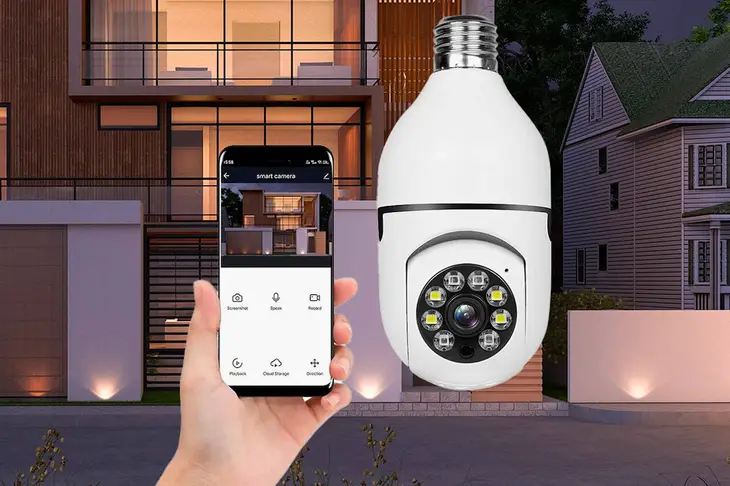
Discover the ultimate solution for discreet home security with our comprehensive guide to light bulb security cameras. Learn how these innovative devices offer easy installation, seamless integration, and powerful surveillance capabilities, providing peace of mind without the hassle of traditional systems.
What Are Light Bulb Security Cameras?
Light bulb security cameras, often referred to as "bulb cameras," are a discreet and innovative type of home surveillance device cleverly disguised as a standard light bulb. They screw into a typical E26/E27 light socket, making them incredibly easy to install and integrate into existing home infrastructure. Unlike traditional security cameras that require drilling, wiring, and often complex mounting, bulb cameras leverage the ubiquitous nature of light fixtures for their placement and power source. This design makes them ideal for users seeking a low-profile, user-friendly, and effective security solution without compromising aesthetics or requiring professional installation.
These cameras typically connect wirelessly to a home Wi-Fi network, allowing users to monitor live feeds, receive motion alerts, and access recorded footage directly from their smartphones or tablets via a dedicated mobile application. Their primary advantage lies in their ability to blend seamlessly into their surroundings, making them less obvious to potential intruders compared to more visible security cameras. This stealth factor is a significant deterrent and enhances the overall effectiveness of home security.
Why Choose a Light Bulb Camera?
The decision to invest in a light bulb security camera is driven by several compelling advantages that cater to modern homeowners' needs for security, convenience, and discretion. In a landscape where visible surveillance can sometimes be aesthetically unpleasing or even a deterrent to guests, bulb cameras offer an elegant compromise. Their integration into existing light fixtures means no additional wiring or complex mounting is required, drastically simplifying the setup process. This ease of installation is a primary draw for individuals who are not technically inclined or prefer a DIY approach to home security.
Furthermore, the discreet nature of these cameras is a significant benefit. They are less likely to be noticed by potential intruders, acting as a silent guardian that can capture evidence without signaling its presence. This stealth factor can be crucial in deterring opportunistic crimes. The affordability of many bulb camera models also makes them an attractive option for budget-conscious consumers looking for effective surveillance solutions without the hefty price tag often associated with professional security systems. With the rise in smart home technology, bulb cameras often integrate seamlessly with other smart devices, offering a connected and convenient security ecosystem.
Statistics from 2025 indicate a growing consumer interest in integrated smart home security solutions, with discreet cameras like bulb cameras seeing a projected 15% year-over-year increase in adoption. This trend highlights the market's demand for solutions that balance robust security features with user-friendly design and unobtrusive aesthetics. The convenience of remote monitoring via mobile apps, coupled with features like motion detection and two-way audio, further solidifies their appeal as a practical and effective choice for safeguarding homes and loved ones.
Key Features to Look For
When selecting a light bulb security camera, several key features should be evaluated to ensure you choose a device that meets your specific security needs and expectations. Prioritizing these features will lead to a more effective and satisfying surveillance experience.
Video Quality: Look for cameras offering at least 1080p Full HD resolution for clear and detailed footage. Higher resolutions like 2K or 4K provide even greater clarity, allowing for better identification of individuals and finer details. Frame rate (FPS) is also important; 15-30 FPS is generally sufficient for smooth video playback.
Night Vision: Essential for round-the-clock surveillance, effective night vision capabilities are crucial. Infrared (IR) night vision is common, but consider cameras with color night vision or advanced low-light performance for enhanced visibility in dark conditions. The range of the night vision is also a factor.
Motion Detection and Alerts: Sophisticated motion detection systems are vital for timely notifications. Look for customizable motion zones, adjustable sensitivity levels, and intelligent detection (e.g., distinguishing between people, pets, and vehicles) to reduce false alarms. Push notifications to your smartphone are standard.
Storage Options: Cameras typically offer cloud storage (often with a subscription fee) or local storage via a microSD card. Evaluate the costs, security, and accessibility of each option. Some cameras support both for redundancy.
Two-Way Audio: This feature allows you to communicate with individuals near the camera through your mobile app, useful for speaking with visitors or deterring potential intruders.
Field of View (FOV): A wider FOV (e.g., 120-180 degrees) allows the camera to cover a larger area, reducing the need for multiple cameras. However, ultra-wide angles can sometimes distort images.
Connectivity: Ensure the camera supports your home's Wi-Fi network (2.4GHz is common, but 5GHz offers faster speeds). Check for reliable signal strength and consider cameras with an Ethernet port as a backup.
Durability and Weather Resistance: If the camera will be used outdoors, it must have an appropriate IP rating (e.g., IP65 or higher) to withstand dust, rain, and temperature fluctuations.
App Functionality: The accompanying mobile app should be intuitive, user-friendly, and offer features like live viewing, playback, settings adjustments, and firmware updates.
Power Source: While most bulb cameras use the light socket, some might require an additional power adapter. Ensure the installation location has a suitable socket and power supply.
Integration with Smart Home Systems: Compatibility with platforms like Amazon Alexa or Google Assistant can enhance convenience and control.
Types of Light Bulb Cameras
Light bulb security cameras, while sharing a common form factor, can be categorized based on their functionalities and intended use. Understanding these distinctions will help you pinpoint the best type for your surveillance needs.
Standard Wi-Fi Bulb Cameras: These are the most common type. They screw into a standard light socket, connect to your Wi-Fi, and stream video to your smartphone. They typically offer motion detection, night vision, and often two-way audio. Their primary function is general surveillance and monitoring.
Pan-Tilt-Zoom (PTZ) Bulb Cameras: These advanced models offer remote control over the camera's lens. You can pan left and right, tilt up and down, and zoom in and out via the mobile app. This provides a much wider coverage area and allows you to focus on specific details without physically repositioning the camera. They are excellent for monitoring larger rooms or outdoor areas.
Outdoor-Rated Bulb Cameras: Designed for external use, these cameras boast enhanced durability and weather resistance. They typically have higher IP ratings (e.g., IP65, IP66) to protect against rain, dust, and extreme temperatures. They often feature wider fields of view and more robust night vision capabilities to handle outdoor conditions.
Dual-Lens Bulb Cameras: Some newer models feature two lenses. One might offer a wide-angle view, while the other provides a more zoomed-in perspective, or they might be positioned to offer a 360-degree view. This dual-lens approach can significantly enhance coverage and detail capture.
Smart Bulb Cameras with Integrated Lighting: While most bulb cameras are designed to replace existing bulbs, some models might offer adjustable LED lighting features. This means you can control the brightness and color temperature of the light in addition to using it for surveillance. This can be useful for ambient lighting or as an additional deterrent.
Battery-Powered Bulb Cameras (Less Common): While the majority rely on the light socket for power, a niche category might exist that uses battery power and can be placed in a light fixture. However, this is less common due to the power demands of continuous recording and Wi-Fi connectivity.
The choice among these types depends on your specific requirements: a standard camera for a small entryway, a PTZ for a large living room or backyard, or an outdoor-rated model for porch monitoring. By understanding these variations, you can make a more informed purchase.
Installation and Setup
One of the most significant advantages of light bulb security cameras is their straightforward installation process, often comparable to changing a regular light bulb. This accessibility makes them a popular choice for DIY enthusiasts and those seeking a hassle-free security upgrade. Here’s a step-by-step guide to get you started:
Step 1: Choose the Right Location
Select a light fixture that is powered and ideally has a good Wi-Fi signal. Consider the area you wish to monitor. For indoor use, living rooms, hallways, or entryways are common. For outdoor use, porches, garages, or backyards are typical. Ensure the fixture can support the weight of the camera bulb, though most are designed to be lightweight.
Step 2: Power Off the Light Fixture
Crucially, before proceeding, turn off the power to the light fixture at the circuit breaker. This is a vital safety precaution to prevent electrical shock. Double-check that the light switch is also in the "off" position.
Step 3: Remove the Old Bulb
Carefully unscrew the existing light bulb from the socket. If the bulb is hot, allow it to cool down completely before removal.
Step 4: Install the Light Bulb Camera
Gently screw the light bulb security camera into the empty socket. Ensure it is seated firmly but do not overtighten, as this could damage the socket or the camera.
Step 5: Power On the Light Fixture
Once the camera is securely in place, return to the circuit breaker and switch the power back on. Then, turn on the light switch for the fixture. The camera should power up, indicated by an LED light or an audible startup sound, depending on the model.
Step 6: Download and Install the Mobile App
Most light bulb cameras require a companion mobile application for setup and operation. Search for the specific app recommended by the manufacturer in your device's app store (iOS App Store or Google Play Store) and download it.
Step 7: Connect the Camera to Your Wi-Fi Network
Open the mobile app and follow the on-screen instructions to create an account or log in. The app will guide you through the process of connecting the camera to your home Wi-Fi network. This typically involves scanning a QR code displayed on your phone with the camera, or entering your Wi-Fi credentials directly into the app. Ensure your phone is connected to the same Wi-Fi network you intend to use for the camera.
Step 8: Configure Camera Settings
Once connected, you can use the app to configure various settings, such as motion detection sensitivity, notification preferences, video quality, and recording schedules. You may also be prompted to set up cloud storage or insert a microSD card for local recording.
Step 9: Test the Camera
Finally, test the camera by walking in front of it to trigger motion detection and checking if you receive alerts on your phone. View the live feed to ensure the video and audio are working correctly. If you have a PTZ model, test the pan, tilt, and zoom functions.
Troubleshooting Tips: If you encounter issues, ensure your Wi-Fi password is correct, the camera is within range of your router, and the light fixture is receiving adequate power. Refer to the manufacturer's manual for specific troubleshooting steps.
Performance and Capabilities
The performance of a light bulb security camera is defined by its ability to reliably capture clear video, detect motion accurately, and provide timely alerts. Modern bulb cameras, especially those released in 2025, offer a surprisingly robust set of capabilities that rival more traditional security systems, all within their discreet form factor.
Video Clarity and Resolution: Most contemporary light bulb cameras boast Full HD (1080p) resolution as a standard. This ensures that footage is sharp enough to identify faces, license plates (at close range), and other important details. Some higher-end models now offer 2K or even 4K resolution, providing exceptionally clear images that are invaluable for forensic analysis or simply for a more immersive viewing experience. Frame rates typically range from 15 to 30 frames per second (FPS), which is sufficient for smooth playback of everyday events.
Night Vision Effectiveness: A critical component of any security camera, night vision on bulb cameras has seen significant improvements. Infrared (IR) LEDs are commonly used to provide black-and-white footage in complete darkness, with ranges often extending from 10 to 30 meters (33 to 100 feet). Some advanced models incorporate "color night vision" technology, which uses ambient light or built-in illumination to produce color images even in very low light conditions, offering better detail and easier identification. The effectiveness of night vision is crucial for round-the-clock surveillance.
Motion Detection Accuracy: Accurate motion detection is paramount to avoid nuisance alerts and ensure that significant events are captured. Modern bulb cameras utilize sophisticated algorithms to detect movement within their field of view. Features like customizable motion zones allow users to define specific areas where motion should be monitored, ignoring irrelevant activity like passing cars or swaying trees. Intelligent detection capabilities are also becoming more common, distinguishing between people, animals, and vehicles, thus reducing false alarms and providing more relevant notifications. Sensitivity adjustments further refine this feature.
Audio Capabilities: Many light bulb cameras include built-in microphones for capturing ambient sound and speakers for two-way audio communication. This feature is invaluable for interacting with visitors, pets, or even deterring potential intruders with your voice remotely via the mobile app. The audio quality can vary, but most offer clear enough sound for these purposes.
Connectivity and Reliability: Reliable Wi-Fi connectivity is essential for seamless streaming and instant alerts. Bulb cameras typically connect to the 2.4GHz Wi-Fi band, which offers better range and penetration through walls than 5GHz. However, some newer models may support dual-band connectivity. The stability of the connection depends on your home network strength and the camera's antenna design. Firmware updates, usually delivered wirelessly, are important for maintaining performance and security.
Storage and Playback: Footage can be stored either locally on a microSD card (up to 128GB or 256GB is common) or in the cloud via a subscription service. Cloud storage offers the advantage of remote access to footage even if the camera is damaged or stolen, while local storage is a cost-effective alternative. Playback through the mobile app is generally intuitive, allowing users to review recorded events by date and time.
Durability: For outdoor use, weather resistance is key. Cameras with IP65 or higher ratings can withstand rain, dust, and temperature extremes, ensuring reliable operation in various environmental conditions.
Overall, the performance of light bulb security cameras in 2025 has advanced significantly, offering a compelling blend of high-quality imaging, intelligent detection, and robust connectivity within a discreet and easy-to-install package.
Advanced Features and Considerations
Beyond the core functionalities, several advanced features and considerations can elevate the utility and effectiveness of a light bulb security camera. These aspects often differentiate basic models from premium solutions and cater to users with more specific or demanding security needs.
Artificial Intelligence (AI) and Smart Detection: As mentioned, AI is revolutionizing motion detection. Beyond differentiating between people and pets, advanced AI can identify specific behaviors like package detection, facial recognition (though privacy concerns are significant here), or even recognize familiar faces. This leads to highly targeted alerts and reduces the likelihood of false positives. For instance, a 2025 model might alert you specifically when a delivery person leaves a package, rather than just detecting general motion.
Pan-Tilt-Zoom (PTZ) Capabilities: While not standard, PTZ functionality is a significant upgrade. It allows for remote control of the camera's direction and zoom, offering a much broader surveillance range from a single point. This is particularly useful for monitoring large rooms, yards, or areas with multiple entry points. Imagine being able to scan your entire backyard from your phone using a camera disguised as a porch light.
360-Degree View: Some bulb cameras employ fisheye lenses or dual-lens systems to provide a panoramic or 360-degree view. This eliminates blind spots and offers a comprehensive overview of the entire space, making it ideal for large open areas or rooms where a single camera needs to cover as much ground as possible.
Integration with Smart Home Ecosystems: Seamless integration with platforms like Amazon Alexa, Google Assistant, or Apple HomeKit is becoming increasingly important. This allows for voice control (e.g., "Show me the front door camera"), inclusion in smart home routines (e.g., turning on lights when motion is detected), and centralized management of your smart devices. Compatibility with IFTTT (If This Then That) also opens up a world of custom automation possibilities.
Local Storage Encryption: For users prioritizing data privacy, cameras that offer encryption for footage stored on microSD cards provide an extra layer of security. This ensures that even if the card is physically removed, the data remains unreadable without the correct decryption key.
Power Over Ethernet (PoE) - Rare for Bulb Cameras: While not typical for bulb cameras due to their design, some advanced security cameras utilize PoE, which delivers both power and data over a single Ethernet cable. This offers superior reliability compared to Wi-Fi but is generally not applicable to the light bulb form factor.
Advanced Connectivity Options: Beyond standard Wi-Fi, some outdoor-rated cameras might offer dual-band Wi-Fi (2.4GHz and 5GHz) for improved speed and reduced interference, or even cellular connectivity as a backup for areas with unreliable internet. However, cellular options are rare for bulb cameras.
Firmware Updates and Security Patches: Regular and automatic firmware updates are crucial for maintaining the security and functionality of any connected device. Look for manufacturers that have a good track record of providing timely updates to address vulnerabilities and introduce new features. Security is paramount, especially for devices connected to your home network.
Power Draw and Compatibility: Ensure the light bulb camera's power consumption is compatible with your existing light fixture's rating. While most are designed to be energy-efficient, it's good practice to check specifications, especially for older fixtures.
By considering these advanced features, users can select a light bulb camera that not only provides basic surveillance but also integrates intelligently into their smart home, offers enhanced control, and delivers a superior level of security and convenience.
Legal and Privacy Aspects
While light bulb security cameras offer immense benefits, it's crucial to navigate the legal and privacy considerations associated with their use. Understanding these aspects ensures responsible deployment and avoids potential legal entanglements. As of 2025, regulations continue to evolve, but several core principles remain consistent.
Recording Audio: In many jurisdictions, it is illegal to record conversations without the consent of all parties involved. Therefore, when using two-way audio features or if the microphone is sensitive enough to pick up conversations, ensure you comply with local laws. Some states and countries have stricter consent laws (one-party vs. two-party consent). It's often advisable to disable audio recording if you are unsure or if it's not a critical feature for your surveillance needs. Many apps provide an option to disable audio recording.
Surveillance of Public Spaces: While you have the right to monitor your private property, extending surveillance into public areas, such as a neighbor's yard, a public sidewalk, or a shared driveway, can infringe on privacy rights. Ensure your camera's field of view is primarily directed at your property. For outdoor cameras, consider the angle to avoid inadvertently capturing footage of neighboring properties or passersby without a legitimate security reason.
Notice and Consent: In certain contexts, particularly in rental properties or shared living spaces, it may be legally or ethically required to inform others that they are being recorded. If you have guests or visitors frequently, consider posting a visible sign indicating that surveillance is in operation. For employees or tenants, explicit consent might be necessary depending on local labor and landlord-tenant laws.
Data Security and Privacy Policies: When using cloud storage or app-based services, you are entrusting your data to a third-party provider. It's essential to review the manufacturer's privacy policy and terms of service. Understand how your data is stored, who has access to it, and what security measures are in place to protect it from breaches. Look for manufacturers that emphasize data encryption and have a strong commitment to user privacy. In 2025, data breaches are a significant concern, making this due diligence paramount.
Facial Recognition Technology: While advanced AI features like facial recognition can be beneficial, they also raise significant privacy concerns. Be aware of the implications of using such technology and ensure it aligns with legal frameworks and ethical considerations in your region. Some jurisdictions are implementing restrictions on the use of facial recognition technology by private entities.
Local Ordinances and HOA Rules: Check for any specific local ordinances or Homeowners Association (HOA) rules that might govern the placement or type of security cameras you can install. Some HOAs have guidelines on visible security measures.
Age of Consent Laws: Be particularly cautious if your camera might capture footage of minors. Laws regarding the recording of children are often very strict.
Responsible Use: Ultimately, the responsibility lies with the user to operate their security cameras legally and ethically. This includes ensuring the technology is used for legitimate security purposes and not for harassment, voyeurism, or other illicit activities. Always err on the side of caution and prioritize privacy when in doubt.
By being informed about these legal and privacy aspects, you can confidently deploy your light bulb security camera while respecting the rights and privacy of others.
Light Bulb Camera vs. Traditional Cameras
Choosing a security solution often involves weighing the pros and cons of different technologies. Light bulb cameras have emerged as a compelling alternative to traditional wired or wireless security cameras, each offering distinct advantages and disadvantages. Understanding these differences is key to selecting the best fit for your needs.
Installation and Setup:
- Light Bulb Cameras: Extremely easy. Simply screw into an existing light socket. No drilling, wiring, or complex mounting required. Setup is typically done via a mobile app and Wi-Fi connection.
- Traditional Cameras (Wired/Wireless): Can be complex. Wired cameras require running cables through walls, which can be labor-intensive and may necessitate professional installation. Wireless cameras are easier but still require mounting, often drilling, and battery changes or power connections.
Discretion and Aesthetics:
- Light Bulb Cameras: Highly discreet. They blend seamlessly into existing home decor and fixtures, making them virtually unnoticeable as surveillance devices.
- Traditional Cameras: Often visible and can be aesthetically unappealing, potentially detracting from home decor. While some modern designs are sleeker, they are generally more conspicuous.
Power Source:
- Light Bulb Cameras: Powered directly by the light socket, eliminating the need for batteries or separate power adapters. This ensures continuous operation as long as the fixture has power.
- Traditional Cameras: Wired cameras rely on a continuous power supply via cables. Wireless cameras often use batteries that require regular recharging or replacement, or they may need a separate power adapter.
Cost:
- Light Bulb Cameras: Generally more affordable, especially for basic models. The cost savings come from simplified manufacturing and the elimination of complex installation.
- Traditional Cameras: Can range widely in price. High-end wired systems with professional installation can be very expensive. Wireless cameras offer a middle ground, but multiple units can add up.
Features and Functionality:
- Light Bulb Cameras: Offer a good range of features including HD video, night vision, motion detection, and two-way audio. PTZ and 360-degree views are becoming more common. However, they are limited by the placement of light fixtures.
- Traditional Cameras: Often offer more advanced features, such as higher resolutions, wider fields of view, superior weatherproofing, and more robust connectivity options (like PoE). They can be placed in virtually any location, regardless of lighting fixtures.
Reliability and Connectivity:
- Light Bulb Cameras: Rely on Wi-Fi, which can be susceptible to interference or signal drops depending on network strength and distance from the router.
- Traditional Cameras: Wired systems offer the most reliable connection. Wireless cameras also rely on Wi-Fi but may have more robust antennas or offer alternative connectivity options.
Scalability:
- Light Bulb Cameras: Scalability is limited by the number of available light sockets. Adding more cameras means finding more suitable fixtures.
- Traditional Cameras: More scalable, as they can be placed strategically throughout a property, allowing for comprehensive coverage of all desired areas.
Summary Table:
| Feature | Light Bulb Camera | Traditional Camera |
|---|---|---|
| Installation | Very Easy (Screw-in) | Complex (Wiring/Mounting) |
| Discretion | High | Low to Medium |
| Power | Light Socket | Wired/Battery/Adapter |
| Cost | Generally Lower | Variable (Can be High) |
| Placement Flexibility | Limited by Light Sockets | High |
| Connectivity | Wi-Fi Dependent | Wired (Reliable), Wi-Fi |
In conclusion, light bulb cameras excel in ease of use, discretion, and affordability, making them ideal for renters, apartment dwellers, or those seeking a simple, unobtrusive surveillance solution. Traditional cameras offer greater placement flexibility, potentially more advanced features, and more robust connectivity, making them suitable for comprehensive, customized security systems.
Real-World Applications and Scenarios
The versatility of light bulb security cameras makes them suitable for a wide array of real-world applications, catering to various needs from home security to small business monitoring. Their discreet nature and ease of installation open up possibilities that might be impractical or aesthetically challenging with traditional cameras.
Home Security:
- Entryway Monitoring: Install in porch lights or entryway fixtures to monitor visitors, deliveries, and deter potential intruders. The camera captures activity without being an obvious security device.
- Garage and Driveway Surveillance: Place in garage ceiling lights or outdoor fixtures to keep an eye on vehicles, monitor comings and goings, and detect any suspicious activity.
- Backyard and Patio Monitoring: Use in outdoor light fixtures to keep watch over pets, children playing, or to monitor for any unauthorized access to your property after dark.
- Interior Room Monitoring: Ideal for monitoring living rooms, hallways, or even nurseries. Their discreet appearance makes them less intrusive in living spaces compared to bulky cameras.
- Apartment and Rental Security: A perfect solution for renters who cannot make permanent modifications to their property. They can be easily installed and removed without leaving a trace.
Small Business Monitoring:
- Retail Store Entryways: Discreetly monitor customer traffic and deter shoplifting at the entrance of small retail outlets.
- Office Spaces: Monitor common areas, reception areas, or storage rooms without making the office feel overly surveilled.
- Warehouse and Storage Units: Place in ceiling fixtures to monitor inventory and activity in smaller storage areas.
Specific Use Cases:
- Monitoring Elderly or Vulnerable Family Members: With two-way audio, these cameras can offer peace of mind, allowing for quick communication if needed.
- Pet Monitoring: Keep an eye on pets while you're away, and use two-way audio to interact with them.
- Vacation Home Security: Provide remote monitoring for second homes or vacation properties, offering a simple way to check in and receive alerts.
- Temporary Surveillance Needs: Useful for monitoring a specific area during a short period, such as during renovations or when expecting a sensitive delivery.
Scenario Example: The Busy Parent
A parent with young children might install a bulb camera in the main living area. This allows them to keep an eye on their children playing while they are in another part of the house, or even while they are out, by checking the live feed on their phone. If a package is delivered, they receive an alert and can check the footage instantly. The camera's discreet nature means it doesn't detract from the home's ambiance.
Scenario Example: The Small Business Owner
A boutique owner might install a bulb camera in their storefront window fixture. This allows them to monitor who enters and leaves the store, deter potential shoplifters, and check on the store's activity remotely during off-hours. The camera's design ensures it doesn't alarm customers or detract from the store's aesthetic.
The adaptability of light bulb cameras means they can be deployed in almost any situation where a standard light bulb fixture exists, offering a blend of security, convenience, and discretion that is hard to match with other surveillance technologies.
Choosing the Right Brand and Model
With a growing market of light bulb security cameras, selecting the right brand and model can feel overwhelming. A strategic approach, focusing on reputable manufacturers and specific features, will ensure you make an informed decision that aligns with your security needs and budget. As of 2025, several brands have established themselves as leaders in this niche.
Reputation and Reliability:
Start by researching brands known for their commitment to quality and customer satisfaction in the smart home and security space. Look for brands that consistently receive positive reviews for product performance, durability, and customer support. Established players often have more robust firmware update schedules and better troubleshooting resources.
Key Brands to Consider (Examples for 2025):
- Reolink: Known for offering a good balance of features, performance, and affordability. Their bulb cameras often come with good resolution and reliable connectivity.
- Wyze: A popular choice for budget-conscious consumers, Wyze offers feature-rich cameras at very competitive prices. Their ecosystem is growing, offering integration with other smart devices.
- TP-Link (Kasa/Tapo): TP-Link is a well-regarded networking company that extends its expertise to smart home devices. Their Kasa and Tapo lines often provide reliable performance and user-friendly apps.
- Lorex: A more established name in the security camera market, Lorex offers robust options that may come with higher price points but often deliver superior build quality and advanced features.
- EZVIZ: A subsidiary of Hikvision, EZVIZ offers a wide range of smart cameras, including bulb models, that are generally well-received for their performance and feature sets.
Feature-to-Price Ratio:
Determine your budget and then prioritize the features that are most important to you. Don't overpay for features you won't use. Conversely, be wary of extremely cheap options that might compromise on video quality, reliability, or security.
Specific Model Considerations:
- Resolution: Aim for at least 1080p. If budget allows and detail is critical, consider 2K or 4K models.
- Night Vision: Check the stated range and whether it offers color night vision if that's important.
- Field of View: A wider FOV (e.g., 120°+) is generally better for covering more area.
- Storage: Decide between cloud storage (consider subscription costs) and local microSD card storage. Check the maximum supported card size.
- Two-Way Audio: Essential if you plan to communicate through the camera.
- PTZ or 360°: If you need to cover a large area from a single point, these features are invaluable.
- Outdoor Rating: Crucial for any camera intended for external use (IP65 or higher).
- App Usability: Read reviews about the mobile app. A clunky or unreliable app can significantly detract from the user experience.
- Smart Home Integration: If you use Alexa, Google Assistant, or other platforms, ensure compatibility.
Reading Reviews:
Pay close attention to user reviews on retail sites and tech blogs. Look for patterns in feedback regarding ease of setup, video quality in different lighting conditions, motion detection accuracy, app stability, and customer support responsiveness. Reviews from 2025 will be most relevant for current performance and features.
Manufacturer Support and Updates:
Research the manufacturer's commitment to providing firmware updates. Regular updates are crucial for security patches and performance improvements. A brand that actively supports its products demonstrates a commitment to long-term customer satisfaction.
By systematically evaluating brands and models based on these criteria, you can confidently select a light bulb security camera that provides effective surveillance, seamless integration, and long-term value.
Maintenance and Troubleshooting
Ensuring your light bulb security camera operates smoothly requires minimal maintenance, but understanding common troubleshooting steps can save you time and frustration. Most issues are easily resolved with a few basic checks.
Routine Maintenance:
- Keep the Lens Clean: Periodically wipe the camera lens with a soft, lint-free cloth to remove dust, smudges, or debris that could impair video quality. For outdoor cameras, check for spiderwebs or insect nests.
- Check Wi-Fi Connection: Ensure your home Wi-Fi is stable and the camera is within a good signal range. If you experience frequent disconnections, consider a Wi-Fi extender or moving your router closer.
- Update Firmware: Regularly check the companion mobile app for firmware updates. Install them promptly, as they often contain security patches, performance improvements, and new features.
- Clean the Bulb Exterior: For outdoor cameras, occasionally wipe down the exterior to remove dirt or grime, especially if it's exposed to the elements.
- Check Storage: If using a microSD card, ensure it's not full. Some cameras automatically overwrite old footage, but it's good to monitor its status.
Common Troubleshooting Steps:
1. Camera Not Powering On:
- Ensure the light switch is on and the circuit breaker is not tripped.
- Check that the bulb camera is screwed in securely.
- Try a different, known-working light bulb in the same fixture to confirm the fixture is receiving power.
- Test the bulb camera in a different, known-working light fixture.
2. No Wi-Fi Connection / Offline:
- Verify your home Wi-Fi network is operational. Restart your router and modem.
- Ensure the camera is within Wi-Fi range. Move the camera closer to the router or consider a Wi-Fi extender.
- Double-check that you entered the correct Wi-Fi password during setup.
- Reset the camera to factory settings and reconfigure the Wi-Fi connection.
3. Poor Video Quality (Blurry, Pixelated):
- Clean the camera lens.
- Check the Wi-Fi signal strength. A weak signal can lead to poor video quality.
- Ensure the camera is not obstructed by anything.
- If the issue persists, the camera's sensor might be faulty.
4. Motion Alerts Not Received or False Alerts:
- Adjust the motion detection sensitivity in the app settings.
- Check if motion zones are configured correctly to exclude irrelevant areas.
- Ensure the camera's firmware is up to date.
- For false alerts, consider if there are environmental factors (e.g., strong sunlight changes, pets) that might be triggering it.
- If alerts are not received, check notification settings in the app and on your phone.
5. Two-Way Audio Not Working:
- Ensure the microphone and speaker are enabled in the app settings.
- Check if the camera has permission to access the microphone on your phone.
- Verify that your phone's volume is turned up and not muted.
- Restart the camera and your mobile app.
6. App Not Responding or Crashing:
- Close and reopen the app.
- Ensure you have the latest version of the app installed.
- Restart your smartphone.
- If the problem persists, try uninstalling and reinstalling the app.
7. Camera Overheating (Rare):
- Ensure the light fixture is not enclosed in a way that restricts airflow, especially if the camera has integrated lighting.
- If the camera is in direct, intense sunlight for extended periods, consider its placement or if it's an outdoor-rated model.
Factory Reset:
As a last resort for persistent issues, a factory reset can often resolve problems. This typically involves pressing and holding a reset button on the camera for a specified duration (refer to the manufacturer's manual). Note that a factory reset will erase all your settings, and you will need to reconfigure the camera from scratch.
By performing regular maintenance and knowing these troubleshooting steps, you can ensure your light bulb security camera remains a reliable part of your security setup.
The Future of Light Bulb Cameras
The evolution of light bulb security cameras is far from over. As technology advances and consumer demands shift, we can anticipate several exciting developments that will further enhance their capabilities, integration, and appeal. The trajectory suggests these discreet surveillance devices will become even more sophisticated and indispensable in smart home ecosystems.
Enhanced AI and Machine Learning:
Expect more advanced AI capabilities. Beyond simple motion detection, future cameras will likely feature sophisticated facial recognition (with careful consideration for privacy regulations), anomaly detection (identifying unusual patterns of activity), and even predictive analytics to flag potential security risks before they occur. Integration with home AI assistants will become more seamless, allowing for natural language queries about events or camera status.
Improved Video and Imaging Technology:
Higher resolutions (beyond 4K), improved HDR (High Dynamic Range) for better contrast in challenging lighting, and enhanced low-light performance (perhaps even more advanced color night vision) will become standard. The development of lens technology may lead to wider, distortion-free fields of view from a single bulb camera, potentially eliminating the need for multiple units in some scenarios.
Seamless Smart Home Integration:
The trend towards interconnected smart homes will continue. Future light bulb cameras will likely offer deeper integration with other smart devices, enabling more complex automation routines. Imagine a camera detecting a person at the door and automatically turning on the porch light, unlocking a smart lock, and sending a notification to your smart display. Compatibility with emerging smart home standards like Matter will ensure interoperability across different brands.
Power Efficiency and Alternative Power:
While currently powered by light sockets, research into more energy-efficient components could lead to cameras that draw less power, allowing them to operate more reliably even with dimmer light settings or in fixtures with less robust power delivery. There might also be exploration into hybrid power solutions for added redundancy.
Advanced Connectivity Options:
While Wi-Fi remains dominant, future models might explore more robust wireless protocols or even integrated cellular backup for areas with notoriously unreliable internet, ensuring continuous connectivity even during outages. Edge computing, where data is processed directly on the camera rather than solely in the cloud, could also lead to faster response times and reduced bandwidth usage.
Enhanced Privacy and Security Features:
As cybersecurity threats evolve, manufacturers will prioritize even stronger encryption, more robust authentication methods, and greater user control over data. Features like on-device processing for sensitive data (like facial recognition) will become more prevalent to enhance privacy. Clearer and more transparent privacy policies will also be expected.
360-Degree and Multi-Lens Innovations:
The development of multi-lens systems within a single bulb form factor will likely lead to true 360-degree surveillance capabilities, offering comprehensive coverage from a single, discreet point. This will further simplify installation and enhance the effectiveness of home monitoring.
In essence, the future of light bulb security cameras points towards devices that are not just cameras disguised as bulbs, but intelligent, integrated components of a secure and connected living space. They will offer unparalleled convenience, advanced intelligence, and robust security, all while maintaining their signature discreetness.
In conclusion, the light bulb security camera represents a significant leap forward in accessible and discreet home surveillance. From their incredibly simple installation to their advanced features like high-definition video, intelligent motion detection, and two-way audio, these devices offer a powerful yet unobtrusive way to protect your property. By understanding the key features, types, and considerations discussed in this guide, you are well-equipped to choose the perfect bulb camera solution. Whether you're a homeowner seeking enhanced peace of mind, a renter looking for a non-permanent security option, or a small business owner needing discreet monitoring, the light bulb camera delivers exceptional value. Invest in a light bulb security camera today and experience the ultimate blend of innovation, convenience, and security for your modern living space.