Unlock the convenience and efficiency of your home with smart plugs. These ingenious devices transform ordinary appliances into connected, controllable tools, offering remote operation, scheduling, and energy monitoring. Discover how a smart plug can revolutionize your daily routines and save you money.
What Exactly Are Smart Plugs?
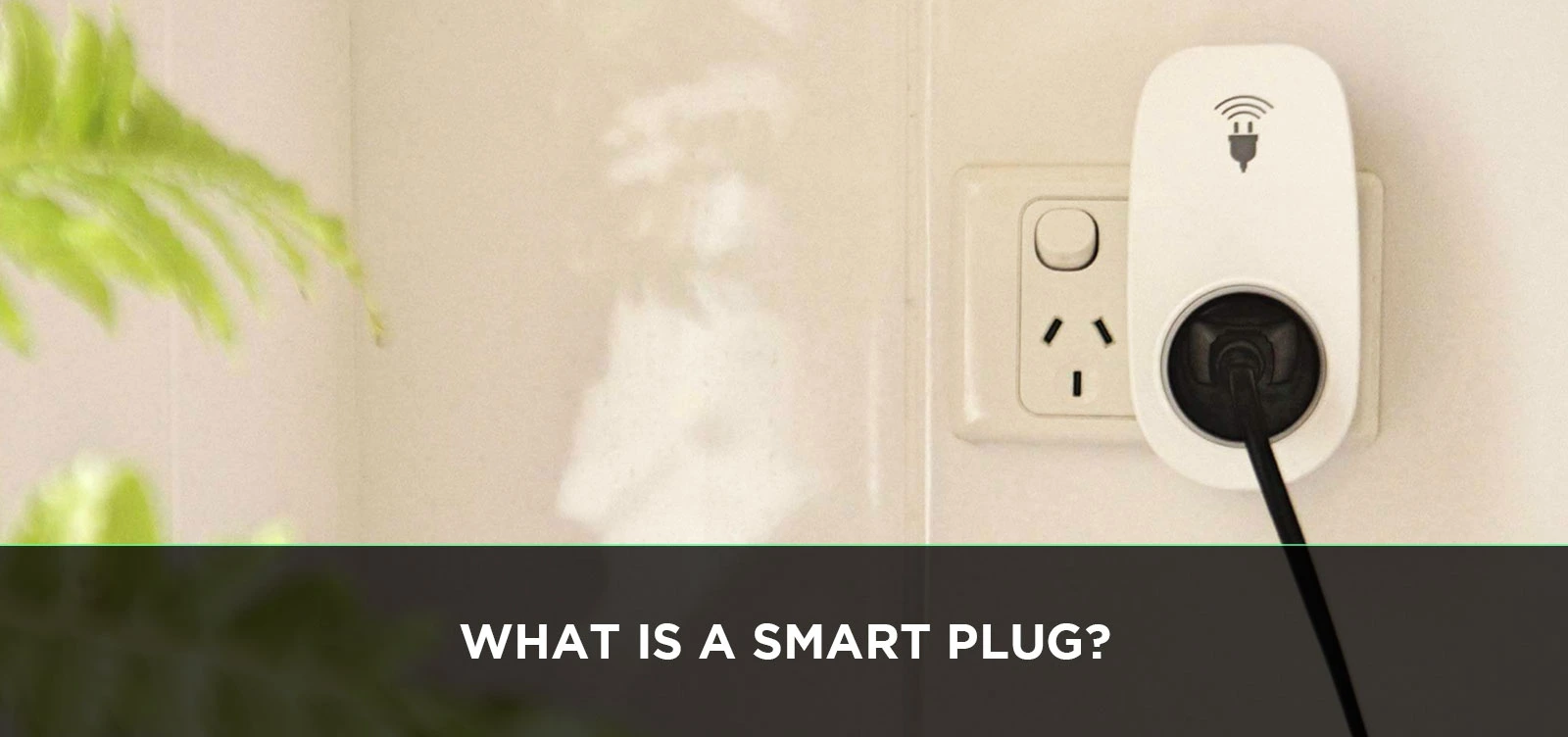
A smart plug is a small, plug-in device that allows you to remotely control any appliance or electronic device plugged into it. Essentially, it acts as a bridge between your traditional, "dumb" devices and your smart home ecosystem. By plugging a lamp, fan, coffee maker, or any other electrical item into a smart plug, you can then control that item through a smartphone app, voice commands via smart assistants like Alexa or Google Assistant, or automated schedules. This simple yet powerful technology offers a gateway to a more convenient, efficient, and connected lifestyle, making it one of the most accessible entry points into the world of smart home technology. In 2025-26, the market for smart plugs continues to grow, with an estimated 45% of US households owning at least one smart home device, and smart plugs being a significant contributor to this adoption rate.
How Do Smart Plugs Work?
At their core, smart plugs operate by interrupting or enabling the flow of electricity to the device plugged into them. The "smart" aspect comes from their ability to receive commands wirelessly. Here's a breakdown of the underlying technology:
1. Connectivity: Most smart plugs connect to your home's Wi-Fi network. Some advanced models may also support Bluetooth or Zigbee/Z-Wave protocols, which require a separate hub but can offer more robust and energy-efficient connections, especially in larger smart home setups. The Wi-Fi connection is crucial as it allows the plug to communicate with your smartphone or smart home hub from anywhere with an internet connection.
2. Control Mechanism: Inside the smart plug is a relay switch. This switch is electronically controlled. When you send a command (e.g., "turn on the lamp" via your phone app), the command travels through your Wi-Fi network to the smart plug. The plug's internal circuitry then activates the relay, either completing the circuit to allow electricity to flow to the connected device or breaking the circuit to cut off power.
3. User Interface: The primary way users interact with smart plugs is through a dedicated mobile application provided by the manufacturer. These apps allow you to:
- Turn devices on and off remotely.
- Set schedules for devices to turn on or off automatically.
- Create custom scenes or routines that involve multiple smart devices.
- Monitor energy consumption (on models with this feature).
- Group multiple smart plugs for simultaneous control.
Many smart plugs also integrate with popular voice assistants like Amazon Alexa, Google Assistant, and Apple's Siri (via HomeKit). This allows for hands-free control of your connected appliances.
4. Powering the Plug: The smart plug itself draws a small amount of power to maintain its connection to the network and process commands. This power consumption is generally minimal, typically less than 1-2 watts, and is a necessary trade-off for the convenience and functionality it provides.
The simplicity of their design belies their powerful functionality, making them an intuitive addition to any home seeking to embrace smart technology.
Key Features and Benefits of Smart Plugs
Smart plugs offer a compelling array of features that translate into tangible benefits for homeowners. These advantages extend beyond mere convenience, touching upon energy savings, enhanced security, and improved lifestyle management. As of 2025-26, the market is saturated with options, but the core benefits remain consistent:
Remote Control
This is arguably the most significant benefit. Imagine leaving for work and realizing you forgot to turn off a curling iron or a space heater. With a smart plug, you can simply open your app and switch it off, preventing potential hazards and saving energy. Conversely, you can turn on lights before you arrive home, creating a welcoming atmosphere and deterring potential intruders.
Scheduling and Automation
Smart plugs allow you to automate tasks based on time of day or even sunrise/sunset. This is incredibly useful for:
- Waking up: Schedule your coffee maker to start brewing a few minutes before your alarm.
- Security: Set lights to turn on and off at random intervals when you're on vacation, mimicking occupancy.
- Energy saving: Automatically turn off devices that draw "phantom power" (like TVs or chargers) overnight or when not in use.
- Comfort: Schedule fans or heaters to turn on before you enter a room.
Energy Monitoring
Many smart plugs come equipped with energy monitoring capabilities. This feature allows you to track the real-time and historical energy consumption of the connected appliance. This data is invaluable for:
- Identifying energy-hungry devices in your home.
- Understanding your electricity usage patterns.
- Making informed decisions to reduce your energy bills.
- Setting budgets for energy consumption.
Studies in 2025 indicate that users who actively monitor their energy usage via smart plugs can see a reduction of up to 15% in their electricity bills by identifying and mitigating phantom power drain and optimizing appliance usage.
Voice Control Integration
For those with smart speakers or voice assistants (Amazon Alexa, Google Assistant, Apple HomeKit), smart plugs offer seamless voice control. Simply say, "Alexa, turn on the living room fan," or "Hey Google, switch off the desk lamp," and your command is executed. This hands-free convenience is a hallmark of modern smart homes.
Scene Creation and Routines
Smart plugs can be integrated into larger smart home routines. For example, you could create a "Goodnight" scene that turns off all lights, locks smart doors, and sets the thermostat. Or a "Movie Time" scene that dims the lights and turns on your entertainment system.
Child Safety Features
Some smart plugs offer features like built-in surge protection, which safeguards connected devices from power surges. While not a direct child safety feature, it protects valuable electronics. More importantly, the ability to remotely turn off devices can be a lifesaver if a child accidentally turns on a potentially dangerous appliance.
Accessibility
For individuals with mobility issues or disabilities, smart plugs can significantly enhance independence. Controlling lights, fans, or even kitchen appliances with voice commands or a simple tap on a smartphone app can make daily tasks much easier.
Cost-Effectiveness
Compared to replacing entire appliances with smart versions, smart plugs are a highly cost-effective way to introduce smart home functionality. They provide a significant upgrade in control and convenience for a relatively low investment. The average cost of a basic smart plug in 2025 ranges from $10-$25, with advanced models featuring energy monitoring and multiple outlets costing between $25-$50.
These features collectively contribute to a more comfortable, secure, and efficient living environment, making smart plugs a valuable addition to any modern home.
Types of Smart Plugs Available
The smart plug market has diversified significantly, offering various types to suit different needs and preferences. Understanding these distinctions can help you make the most informed purchase. Here are the primary categories:
Standard Wi-Fi Smart Plugs
These are the most common and widely available type. They connect directly to your home's 2.4GHz Wi-Fi network, requiring no additional hub. They are generally easy to set up and control via a smartphone app or voice assistants. Their main advantage is their plug-and-play nature and broad compatibility.
Bluetooth Smart Plugs
Bluetooth smart plugs connect to your smartphone or tablet via Bluetooth. This means you can only control them when you are within Bluetooth range (typically around 30 feet). They don't require a Wi-Fi network, which can be an advantage in areas with unreliable Wi-Fi. However, their limited range makes them less suitable for remote control when you're away from home.
Zigbee and Z-Wave Smart Plugs
These plugs utilize low-power wireless protocols (Zigbee or Z-Wave) that are designed specifically for smart home devices. They offer several advantages:
- Mesh Networking: Both Zigbee and Z-Wave create a mesh network, meaning each device can act as a repeater, extending the range and reliability of your smart home network.
- Lower Power Consumption: They generally consume less power than Wi-Fi devices.
- Dedicated Hub Required: The main drawback is that they require a compatible Zigbee or Z-Wave hub (e.g., Samsung SmartThings, Hubitat, or specific smart speakers with built-in hubs) to connect to your home network and the internet.
These are ideal for users with larger smart homes or those seeking a more robust and integrated system.
Energy Monitoring Smart Plugs
As discussed in the benefits section, these plugs go beyond simple on/off control. They provide detailed insights into the energy consumption of the connected device, allowing for better energy management and cost savings. They are often Wi-Fi enabled but can also be found in Zigbee/Z-Wave variants.
Outdoor Smart Plugs
Designed to withstand the elements, outdoor smart plugs are weatherproof and durable. They are perfect for controlling landscape lighting, holiday decorations, garden pumps, or other devices used in outdoor spaces. They typically connect via Wi-Fi and are built to handle rain, dust, and temperature fluctuations.
Multi-Outlet Smart Plugs
These devices consolidate multiple smart outlets into a single unit. This is incredibly useful for managing a cluster of devices behind a TV stand, entertainment center, or desk. Each outlet can often be controlled independently, offering granular control over a group of electronics.
Smart Plugs with Built-in Features
Some smart plugs come with additional integrated features:
- Surge Protection: Protects connected devices from electrical spikes.
- USB Ports: Include USB ports for charging devices directly, reducing the need for separate power adapters.
- Night Lights: Some plugs have a small, integrated LED light, useful for hallways or bedrooms.
Smart Plugs with Physical Buttons
While most smart plugs are controlled via apps or voice, some include a physical button on the device itself. This allows for manual on/off control directly at the plug, which can be convenient for quick adjustments without needing your phone.
The choice between these types depends on your existing smart home setup, your connectivity needs, the intended use, and your budget. For most users starting out, a standard Wi-Fi smart plug is an excellent and affordable entry point.
Choosing the Right Smart Plug for Your Needs
With a plethora of smart plug options available, selecting the perfect one can feel overwhelming. To make an informed decision, consider the following factors:
1. Connectivity Protocol (Wi-Fi, Bluetooth, Zigbee/Z-Wave)
Wi-Fi: Best for beginners, no hub required, easy setup, remote access. Suitable for most users. Ensure your Wi-Fi network is stable.
Bluetooth: Limited range, no Wi-Fi needed. Good for simple, close-proximity control of a single device.
Zigbee/Z-Wave: Requires a hub, but offers better range, reliability, and lower power consumption for larger smart homes. Ideal for those building an integrated smart home system.
2. Smart Home Ecosystem Compatibility
If you already use a smart home assistant like Amazon Alexa, Google Assistant, or Apple HomeKit, ensure the smart plug is compatible. Most Wi-Fi plugs work with Alexa and Google Assistant. HomeKit compatibility often requires specific certifications and may be less common or more expensive.
Tip: Check the product packaging or description for logos like "Works with Alexa," "Works with Google Assistant," or "Works with Apple HomeKit."
3. Features and Functionality
Basic On/Off: Sufficient for simple tasks like turning lamps on/off remotely.
Energy Monitoring: Essential if you want to track and reduce energy consumption. Look for detailed reporting in the app.
Multiple Outlets: Useful for managing several devices from one plug, especially behind entertainment centers.
USB Ports: Convenient for charging phones or tablets directly from the plug.
Outdoor Use: Necessary for any application exposed to the elements.
Surge Protection: A good safety feature for protecting sensitive electronics.
4. App Experience and Ease of Use
The manufacturer's app is your primary interface. Read reviews to gauge the app's intuitiveness, reliability, and feature set. Some apps are more user-friendly than others, and some offer more advanced customization options.
5. Brand Reputation and Reliability
Stick with reputable brands known for producing reliable smart home devices. Brands like TP-Link (Kasa), Wyze, Wemo, Eve, and Meross generally offer good quality and support. Research customer reviews for insights into product longevity and customer service.
6. Power Rating
Ensure the smart plug can handle the power requirements of the device you intend to plug into it. Check the maximum wattage or amperage rating of the smart plug and compare it to the device's specifications. Overloading a smart plug can be a fire hazard.
Example: A high-wattage appliance like a space heater or a toaster oven will require a smart plug with a higher power rating than a desk lamp.
7. Price and Value
Smart plugs range from $10 to $50 or more. Determine your budget and prioritize features. While cheaper options exist, they might lack advanced features, have a less reliable app, or be less durable. Consider the long-term value, especially if energy monitoring or robust scheduling is important.
8. Security and Privacy
Look for brands that have a good track record for security. Ensure the app uses secure communication protocols and that the company has a clear privacy policy. Regular firmware updates are also a good sign that the manufacturer is committed to security.
By carefully evaluating these points, you can confidently select a smart plug that meets your specific needs and enhances your home automation experience.
Setting Up and Using Your Smart Plug
Setting up a smart plug is typically a straightforward process, designed for even the least tech-savvy users. Here’s a general step-by-step guide:
Step 1: Unboxing and Preparation
Open your smart plug's packaging. You'll usually find the smart plug itself and a quick start guide. Ensure you have a stable 2.4GHz Wi-Fi network and know your Wi-Fi password. For Zigbee/Z-Wave plugs, ensure your hub is set up and connected to your network.
Step 2: Download the Manufacturer's App
Most smart plugs require a dedicated mobile app. Scan the QR code in the manual or search for the brand's app (e.g., Kasa Smart, Wyze, Wemo) in your smartphone's app store (iOS App Store or Google Play Store). Download and install the app.
Step 3: Create an Account or Log In
Open the app and follow the prompts to create a new account or log in if you already have one. This account is used to manage your smart devices and access them remotely.
Step 4: Plug In the Smart Plug
Plug the smart plug into a standard wall outlet. The plug will likely have an indicator light that flashes, signifying it's in pairing mode. If it doesn't flash, there's usually a button on the plug that you can press and hold for a few seconds to initiate pairing mode.
Step 5: Add the Device in the App
Within the app, look for an option to "Add Device," "Set up New Device," or a "+" icon. Select the type of device you are adding (e.g., "Smart Plug").
Step 6: Connect to Your Wi-Fi Network
The app will guide you through connecting the smart plug to your home Wi-Fi network. You'll typically need to select your Wi-Fi network from a list and enter your Wi-Fi password. For Bluetooth plugs, you'll select the plug from a list of nearby Bluetooth devices.
For Zigbee/Z-Wave: You will typically put your hub into pairing mode and then activate the smart plug (often by plugging it in or pressing a button), and the hub will discover it.
Step 7: Name Your Smart Plug
Once connected, the app will prompt you to give your smart plug a name. Choose a descriptive name that is easy to remember and use with voice commands (e.g., "Living Room Lamp," "Bedroom Fan," "Coffee Maker").
Step 8: Test the Smart Plug
The app will usually confirm successful setup. You can then use the app to turn the smart plug on and off to test its functionality. If you have connected it to a voice assistant, try giving a voice command.
Step 9: Connect to Voice Assistants (Optional)
If you want to use voice control, open your smart assistant's app (e.g., Amazon Alexa app, Google Home app) and link your smart plug account. Follow the instructions within the assistant's app to discover and enable control of your new smart plug.
Using Your Smart Plug
Once set up, you can control your smart plug in several ways:
- Via the Manufacturer's App: Open the app to turn the device on/off, set schedules, create timers, or monitor energy usage.
- Via Voice Commands: Use your smart speaker or phone to control the plug (e.g., "Hey Google, turn on the desk lamp").
- Via Schedules and Automations: Set up recurring schedules in the app for automatic operation.
- Via Smart Home Routines: Integrate the plug into broader smart home scenes or routines with other devices.
Troubleshooting Tip: If you encounter issues, ensure your Wi-Fi is working, the plug is within range, and you've entered the correct Wi-Fi password. Restarting your router and the smart plug can often resolve connectivity problems.
Real-World Smart Plug Use Cases
Smart plugs are incredibly versatile, offering practical solutions for a wide range of everyday scenarios. Their ability to bring intelligence to ordinary devices unlocks a wealth of convenience and efficiency. Here are some compelling use cases:
1. Home Automation for Convenience
- Morning Routine: Schedule your coffee maker to start brewing 5 minutes before your alarm. Have your bedroom lamp gently turn on at your wake-up time.
- Evening Wind-Down: Create a "Relax" scene that dims lights, turns on a calming fan, and switches off other non-essential devices.
- Welcome Home: Set lights to turn on automatically as you approach your home (requires location-based triggers or manual activation) or simply turn them on with a voice command as you arrive.
2. Energy Saving and Cost Reduction
- Eliminate Phantom Power Drain: Many electronics draw power even when turned off (standby mode). Use smart plugs to completely cut power to TVs, gaming consoles, chargers, and computers when not in use. This can significantly reduce your electricity bill.
- Optimize Appliance Usage: Schedule energy-intensive appliances like dehumidifiers or air purifiers to run only during off-peak electricity hours when rates are lower.
- Monitor Consumption: Use energy-monitoring smart plugs to identify which devices are consuming the most power and make adjustments accordingly.
3. Enhanced Home Security
- Vacation Mode: Program lights and radios to turn on and off at random intervals when you're away, simulating occupancy and deterring burglars.
- Remote Monitoring: If you have a smart camera or sensor plugged into a smart plug, you can remotely turn it on or off as needed.
- Safety Checks: Remotely turn off appliances like irons, hair straighteners, or space heaters if you forget to do so after leaving the house.
4. Pet Care
- Automated Pet Feeders: While dedicated smart feeders exist, you can use a smart plug to control the power to a timer-based automatic feeder, ensuring precise feeding schedules.
- Pet Entertainment: Schedule pet-friendly lights or music to play at certain times to keep pets entertained while you're out.
- Temperature Control: Use a smart plug with a pet-safe heater or fan to maintain a comfortable temperature in your pet's living area.
5. Plant Care
- Grow Lights: Automate grow lights for indoor plants, ensuring they receive the optimal amount of light each day.
- Watering Systems: Control small water pumps for automated plant watering systems.
6. Holiday Decorations
- Effortless Decor: Control your outdoor holiday lights or indoor festive displays with schedules or voice commands, making setup and takedown a breeze.
- Energy Savings: Ensure decorations aren't left on all night unnecessarily.
7. Accessibility and Assistance
- For Individuals with Mobility Issues: Control lamps, fans, and other devices without needing to reach for switches or get up.
- Elderly Care: Help elderly individuals manage their environment more easily, ensuring lights are on when needed or appliances are turned off safely.
8. Managing "Dumb" Appliances
The beauty of smart plugs is their ability to make any appliance smart. This includes:
- Fans: Turn on/off or adjust fan speed (if the fan has physical buttons that can be activated by power cycling).
- Lamps: Control lighting ambiance and schedules.
- Toasters/Kettles: Schedule them to be ready when you wake up (ensure they have auto-shutoff features for safety).
- Air Purifiers/Humidifiers: Automate operation based on schedules or air quality readings from other smart sensors.
These are just a few examples, and as you integrate smart plugs into your home, you'll undoubtedly discover even more innovative ways to leverage their capabilities to simplify your life.
Smart Plugs and Energy Efficiency: A Deep Dive
The promise of energy efficiency is a major driver for smart plug adoption. While they are not a panacea for all energy woes, they offer significant potential for reducing electricity consumption and, consequently, utility bills. Let's delve deeper into how smart plugs contribute to a more energy-efficient home in 2025-26.
Understanding Phantom Power (Standby Power)
Many modern electronic devices continue to draw power even when they are "off." This is known as phantom power or standby power. Devices like televisions, gaming consoles, computers, chargers, microwaves, and even some smart home hubs consume this "invisible" energy. While the individual draw might be small (often less than 1-5 watts), the cumulative effect across multiple devices and throughout the day can be substantial. In 2025, it's estimated that phantom power accounts for 5-10% of a typical household's annual electricity consumption, costing consumers hundreds of dollars annually.
How Smart Plugs Combat Phantom Power
Smart plugs provide a simple yet effective solution: they act as a master switch for connected devices. By using scheduling or manual control through an app or voice command, you can completely cut off power to devices when they are not in use. For example:
- Overnight: Schedule all entertainment system components (TV, soundbar, gaming console) to power off completely after a certain hour.
- During Work/School: Ensure computers, monitors, and chargers are powered down when no one is home.
- When Away on Vacation: Turn off all non-essential electronics to eliminate all standby power draw.
This ability to enforce a complete power cut, rather than relying on devices' standby modes, is where smart plugs offer the most significant energy savings.
Leveraging Energy Monitoring Features
Many smart plugs come equipped with energy monitoring capabilities, providing real-time and historical data on the power consumption of the connected appliance. This feature transforms the smart plug from a simple remote switch into a powerful diagnostic tool for energy efficiency:
- Identify Energy Hogs: By monitoring individual devices, you can pinpoint which appliances are consuming the most energy, even when you thought they were off. This data can be surprising and eye-opening.
- Understand Usage Patterns: The app often provides graphs and reports showing energy usage over time (daily, weekly, monthly). This helps you understand when your appliances are most active and identify opportunities for optimization.
- Set Energy Budgets: For energy-conscious individuals, the data can be used to set personal energy consumption goals for specific devices or the household as a whole.
- Verify Savings: After implementing changes based on monitoring data (e.g., turning off a device), you can track the actual reduction in energy consumption to quantify your savings.
According to a 2025 study by the National Renewable Energy Laboratory (NREL), households that actively use energy monitoring features on smart plugs and take action based on the data can achieve energy savings of up to 15-20% on the devices managed by those plugs.
Optimizing Appliance Schedules
Beyond just eliminating standby power, smart plugs allow for intelligent scheduling that can further enhance efficiency:
- Off-Peak Usage: If your electricity provider offers time-of-use rates, you can schedule high-consumption appliances (like electric water heaters or pool pumps, if compatible and safe) to run during cheaper off-peak hours.
- Smart Cycling: For devices like fans or air purifiers, you can set them to run intermittently rather than continuously, maintaining air quality or comfort while using less energy.
- "Smart" Thermostat Integration: While not directly controlling thermostats, smart plugs can be used with devices like portable heaters or fans to automate their operation in conjunction with smart thermostat settings, ensuring you only heat or cool occupied spaces efficiently.
The Role of Smart Plugs in a Connected, Efficient Home
In the context of a broader smart home, smart plugs are a foundational element for energy efficiency. They allow for granular control and monitoring of individual devices, which is crucial for optimizing overall energy usage. When integrated with other smart devices and systems (like smart thermostats or energy management platforms), they can contribute to a more sophisticated and automated approach to energy conservation.
While smart plugs themselves consume a small amount of energy to maintain their connectivity, this is negligible compared to the potential savings they enable by controlling larger appliances. By making informed choices about which devices to plug into smart plugs and actively using their features like scheduling and energy monitoring, consumers can significantly reduce their carbon footprint and their electricity bills.
Security and Privacy Considerations
As with any connected device, smart plugs raise important questions about security and privacy. Because they connect to your home network and often to cloud services, they can potentially be vulnerable to cyber threats. Understanding these risks and taking appropriate precautions is crucial for a secure smart home experience in 2025-26.
Potential Security Vulnerabilities
- Weak Passwords: If the smart plug or your Wi-Fi network uses weak, default, or easily guessable passwords, it can be a gateway for unauthorized access.
- Outdated Firmware: Manufacturers release firmware updates to patch security vulnerabilities. Devices with outdated firmware are more susceptible to exploitation.
- Unsecured Network Connections: If the communication between your app, the cloud, and the smart plug is not properly encrypted, data could be intercepted.
- Botnets: Compromised smart devices can be enlisted into botnets, used to launch Distributed Denial of Service (DDoS) attacks or send spam without the owner's knowledge.
- Physical Tampering: While less common, physical access to the plug could potentially allow for manipulation.
Privacy Concerns
- Data Collection: Smart plug manufacturers collect data about your device usage, including when you turn devices on/off, schedules you set, and (for energy monitoring plugs) your energy consumption patterns.
- Data Storage and Sharing: Understanding where this data is stored (locally or in the cloud) and how it is used or shared with third parties is important. Some companies may use aggregated, anonymized data for market research or product improvement.
- App Permissions: The mobile app may request permissions that seem unnecessary (e.g., access to contacts or location), which could be a privacy concern if not clearly justified.
How to Mitigate Risks
Fortunately, there are several steps you can take to enhance the security and privacy of your smart plugs:
- Choose Reputable Brands: Opt for well-known manufacturers with a strong track record for security and privacy. These companies are more likely to invest in secure development practices and provide timely updates.
- Change Default Passwords: Immediately change any default passwords on your smart plug (if applicable) and, most importantly, ensure your home Wi-Fi network has a strong, unique password.
- Enable Strong Wi-Fi Security: Use WPA2 or WPA3 encryption for your Wi-Fi network.
- Keep Firmware Updated: Regularly check for and install firmware updates for your smart plugs and your router. Many devices offer automatic updates.
- Use Two-Factor Authentication (2FA): If the smart plug manufacturer's app offers 2FA for your account, enable it. This adds an extra layer of security by requiring a second verification step (e.g., a code from your phone) when logging in.
- Create a Guest Network: Consider setting up a separate guest Wi-Fi network for your smart devices. This isolates them from your main network where sensitive devices like computers and smartphones reside, limiting the potential damage if a smart device is compromised.
- Review Privacy Policies: Before purchasing or setting up a device, take a moment to review the manufacturer's privacy policy to understand what data is collected and how it's used.
- Limit App Permissions: Only grant the smart plug app the permissions it absolutely needs to function.
- Disable Unused Features: If your smart plug has features you don't use (e.g., remote access when you're not using it), consider disabling them if possible.
- Secure Your Router: Your router is the gateway to your network. Ensure it has the latest firmware, a strong password, and that UPnP (Universal Plug and Play) is disabled unless absolutely necessary, as it can be a security risk.
By being proactive and implementing these security best practices, you can enjoy the convenience of smart plugs while minimizing the associated risks to your digital security and personal privacy.
Integration with Smart Home Ecosystems
The true power of smart plugs is amplified when they are integrated into a broader smart home ecosystem. This allows for seamless control, automation, and interoperability with other smart devices, creating a more cohesive and intelligent living environment. In 2025-26, this integration is more robust and user-friendly than ever.
Voice Assistants: The Command Center
The most common and accessible form of integration is with voice assistants. Smart plugs are designed to work with major platforms:
- Amazon Alexa: Users can link their smart plug accounts (e.g., Kasa, Wemo) to Alexa through the Alexa app. This allows for voice control of individual plugs or groups of plugs. Alexa routines can also incorporate smart plugs for automated actions.
- Google Assistant: Similar to Alexa, Google Assistant integrates with most smart plug brands via the Google Home app. Voice commands and Google Assistant routines can control smart plugs effectively.
- Apple HomeKit: For Apple users, HomeKit offers a secure and integrated experience. HomeKit-compatible smart plugs can be controlled via Siri, the Home app on iPhones and iPads, and Apple Watch. HomeKit devices often use a more secure pairing process and a dedicated Home Hub (like Apple TV or HomePod) for remote access and automation.
Example: You can say, "Hey Google, turn on the fan and dim the living room lights," and if your fan and lights are connected via smart plugs and compatible smart bulbs respectively, both actions will occur simultaneously.
Creating Smart Home Routines and Scenes
Smart plugs are essential components for building custom routines and scenes within your smart home ecosystem. These are pre-programmed sequences of actions that can be triggered by a voice command, a schedule, or another smart device.
- "Good Morning" Routine: Triggered by your alarm or a voice command, this routine could turn on your coffee maker via a smart plug, gradually increase bedroom lights, and turn on a smart speaker.
- "Movie Night" Scene: A single command could dim the lights (via smart bulbs or smart plugs controlling lamps), turn on your TV and sound system (via smart plugs), and close smart blinds.
- "Away" Routine: When you leave the house, a single command or geofencing trigger could turn off all connected lights, fans, and entertainment devices via smart plugs, enhancing security and saving energy.
Interoperability with Other Smart Devices
Beyond voice assistants, smart plugs can interact with other smart devices:
- Smart Sensors: A motion sensor could trigger a smart plug to turn on a light in a hallway. A door sensor could turn on a fan when a specific door is opened.
- Smart Thermostats: While not directly controlling the thermostat, a smart plug can control a portable heater or fan to supplement the main heating/cooling system, helping to maintain desired temperatures more efficiently.
- Smart Cameras: You could use a smart plug to remotely power cycle a smart camera if it becomes unresponsive, ensuring continuous monitoring.
Choosing Ecosystem-Friendly Plugs
When selecting smart plugs, consider which ecosystem you are primarily invested in:
- For Alexa/Google Home Users: Most Wi-Fi smart plugs will offer seamless integration.
- For Apple HomeKit Users: Look specifically for plugs that are certified "Works with Apple HomeKit." These often offer a more robust and secure experience within the Apple ecosystem.
- For Advanced Users (Hub-Based): If you use a Zigbee or Z-Wave hub like SmartThings or Hubitat, ensure the plugs are compatible with your chosen hub for maximum interoperability and local control.
The Future of Integration
The trend in 2025-26 is towards greater interoperability, with initiatives like Matter aiming to create a unified standard for smart home devices. As Matter adoption grows, the lines between different ecosystems will blur, making it even easier for smart plugs from various manufacturers to work together seamlessly.
By carefully selecting smart plugs that are compatible with your preferred ecosystem and by actively building routines and scenes, you can transform your home into a truly intelligent and responsive environment.
Troubleshooting Common Smart Plug Issues
Despite their user-friendly design, smart plugs can occasionally encounter issues. Fortunately, most problems are relatively easy to resolve with a few basic troubleshooting steps. Here are some common issues and their solutions:
1. Smart Plug Not Connecting to Wi-Fi
Symptoms: The plug fails to connect during setup, or it frequently disconnects from the network.
Solutions:
- Check Wi-Fi Password: Ensure you've entered the correct Wi-Fi password. Passwords are case-sensitive.
- 2.4GHz Network: Most smart plugs only support 2.4GHz Wi-Fi networks. If you have a dual-band router (2.4GHz and 5GHz), ensure your phone is connected to the 2.4GHz network during setup.
- Router Proximity: Make sure the smart plug is within a reasonable range of your Wi-Fi router. Walls and other obstructions can weaken the signal.
- Router Restart: Power cycle your Wi-Fi router by unplugging it for 30 seconds and plugging it back in.
- Smart Plug Reset: Reset the smart plug to its factory default settings. This usually involves pressing and holding a button on the plug for 5-10 seconds until the indicator light flashes. Then, try the setup process again.
- Check Router Settings: Ensure your router's firewall isn't blocking the smart plug. Some routers have MAC filtering that might need to be adjusted.
2. Smart Plug Unresponsive in App
Symptoms: The app shows the plug as "offline" or commands sent from the app have no effect.
Solutions:
- Check Power: Ensure the smart plug is receiving power and the connected device is on (if applicable).
- Check Wi-Fi: Verify that your home Wi-Fi network is working correctly.
- Restart the Plug: Unplug the smart plug, wait 10 seconds, and plug it back in.
- Restart the App: Close and reopen the smart plug's mobile app.
- Check Cloud Service: Occasionally, the manufacturer's cloud service might be experiencing an outage. Check their website or social media for status updates.
- Re-link Account: If integrated with a voice assistant, try unlinking and re-linking the account.
3. Voice Commands Not Working
Symptoms: Smart speaker (Alexa, Google Assistant) doesn't recognize commands for the smart plug.
Solutions:
- Check Device Name: Ensure the name you're using in your voice command matches the name you assigned to the smart plug in the app (e.g., "Living Room Lamp").
- Check Integration: Verify that the smart plug account is still linked correctly in your voice assistant's app (Alexa app, Google Home app).
- Discover Devices: In the voice assistant app, try running a "discover devices" command to re-sync your smart home devices.
- Check Internet Connection: Voice commands require an active internet connection for both your smart speaker and the smart plug.
- Re-enable Skill/Action: In the voice assistant app, disable and then re-enable the smart plug's skill or action.
4. Device Connected to Smart Plug Won't Turn On/Off
Symptoms: The smart plug itself responds (indicator light changes), but the connected appliance doesn't power on or off.
Solutions:
- Check Appliance Power: Ensure the appliance is functioning correctly when plugged directly into a wall outlet.
- Check Power Rating: Verify that the appliance's power consumption does not exceed the smart plug's maximum wattage or amperage rating. Overloading can prevent operation or damage the plug.
- Appliance Type: Some appliances with complex electronics or physical switches that need to be manually flipped may not work reliably with smart plugs. Simple on/off appliances are best.
- Test with Another Device: Plug a known working, simple device (like a lamp) into the smart plug to see if it controls it correctly.
5. Energy Monitoring Data is Inaccurate
Symptoms: The energy consumption readings seem too high, too low, or erratic.
Solutions:
- Ensure Correct Device: Make sure the energy monitoring plug is indeed connected to the device you are trying to monitor.
- Allow Calibration Time: For the first few hours or days, readings might be less accurate as the plug calibrates.
- Check for Updates: Ensure the plug's firmware and the app are up to date.
- Contact Support: If the issue persists and the readings are significantly off, there might be a hardware defect. Contact the manufacturer's customer support.
General Tip: Always refer to the specific user manual for your smart plug model, as setup and troubleshooting steps can vary slightly between brands and models.
The Future of Smart Plugs
The smart plug, a simple yet transformative device, is far from reaching its full potential. As the smart home landscape continues to evolve, smart plugs are poised to become even more integral, intelligent, and indispensable. Here's a glimpse into what the future holds:
Enhanced Interoperability with Matter
The widespread adoption of the Matter standard is set to revolutionize smart home connectivity. Matter aims to unify smart home devices under a single, IP-based protocol, allowing devices from different manufacturers to communicate seamlessly. Smart plugs will be among the first beneficiaries, meaning you'll have more freedom to mix and match brands without worrying about compatibility issues. This will simplify setup, improve reliability, and open up new automation possibilities across diverse ecosystems.
Advanced Energy Management Features
Expect smart plugs to offer even more sophisticated energy monitoring and management capabilities. This could include:
- Predictive Energy Usage: AI-powered algorithms that learn your habits and predict future energy consumption, offering proactive suggestions for savings.
- Integration with Grid Data: Plugs that can communicate with utility providers to automatically shift energy usage to times of lower demand or higher renewable energy availability, potentially earning users credits or rebates.
- Granular Load Balancing: More intelligent management of power distribution within the home to prevent circuit overloads and optimize overall efficiency.
Increased Integration with AI and Machine Learning
Artificial intelligence will play a larger role in how smart plugs operate. They will become more proactive and adaptive:
- Behavioral Learning: Plugs that learn your routines and preferences to automatically adjust device operation without explicit programming. For example, learning when you typically leave the house and automatically powering down connected devices.
- Contextual Automation: Plugs that can respond to a wider range of contextual cues, such as weather forecasts, local events, or even biometric data from wearables, to optimize appliance usage.
- Natural Language Understanding: Improved voice control that understands more complex and nuanced commands.
Greater Focus on Security and Privacy
As smart homes become more prevalent, the importance of robust security and privacy will only grow. Future smart plugs will likely feature:
- Enhanced Encryption: Stronger, end-to-end encryption for all data transmission.
- On-Device Processing: More processing power within the plug itself to handle tasks locally, reducing reliance on cloud services and enhancing privacy.
- Advanced Authentication: More secure methods for device authentication and network access.
- Transparent Data Policies: Clearer and more user-friendly privacy policies, giving users greater control over their data.
Specialized Smart Plugs
We may see a rise in specialized smart plugs designed for specific tasks or environments:
- Industrial-Grade Plugs: More robust plugs for commercial or industrial applications.
- Plugs with Built-in Sensors: Integrated sensors for temperature, humidity, or air quality that can trigger automations beyond simple on/off control.
- Plugs with Power Delivery (PD) or GaN Technology: For faster and more efficient charging of connected devices.
Sustainability and Eco-Friendliness
Manufacturers are increasingly focusing on sustainability. Future smart plugs might be made from recycled materials, consume less power in standby mode, and have longer lifespans, contributing to a more environmentally conscious smart home.
In essence, the smart plug of the future will be less of a simple remote switch and more of an intelligent, adaptive, and secure node within a deeply interconnected smart home, contributing to greater convenience, efficiency, and sustainability.
Conclusion
Smart plugs have evolved from a niche gadget to an essential component of the modern connected home. They offer an accessible and cost-effective way to infuse intelligence into everyday appliances, unlocking a new level of convenience, control, and efficiency. Whether you're looking to automate your morning routine, save on energy bills by eliminating phantom power, enhance your home's security, or simply enjoy the luxury of voice-controlled appliances, smart plugs deliver. With their straightforward setup, broad compatibility with major smart home ecosystems like Alexa and Google Assistant, and increasingly sophisticated features like energy monitoring, they provide tangible benefits for every household. As technology advances, particularly with the advent of standards like Matter, smart plugs will become even more integrated, intelligent, and secure, further solidifying their role in shaping the future of our homes. Investing in smart plugs is an investment in a smarter, more comfortable, and more efficient lifestyle.